Build a Python Stock Quote Snapshot with Explicit Missing-Data States
TickDB Research ·
A Python stock API response needs more than a successful HTTP request before it can become a useful quote snapshot. Check the response envelope, match returned symbols to the requested list, and preserve missing fields instead of replacing them with zero. The documented TickDB ticker schema supplies the request and required fields; a defensive parser separates absent, null, blank, invalid, and numeric values without claiming that a snapshot proves freshness.
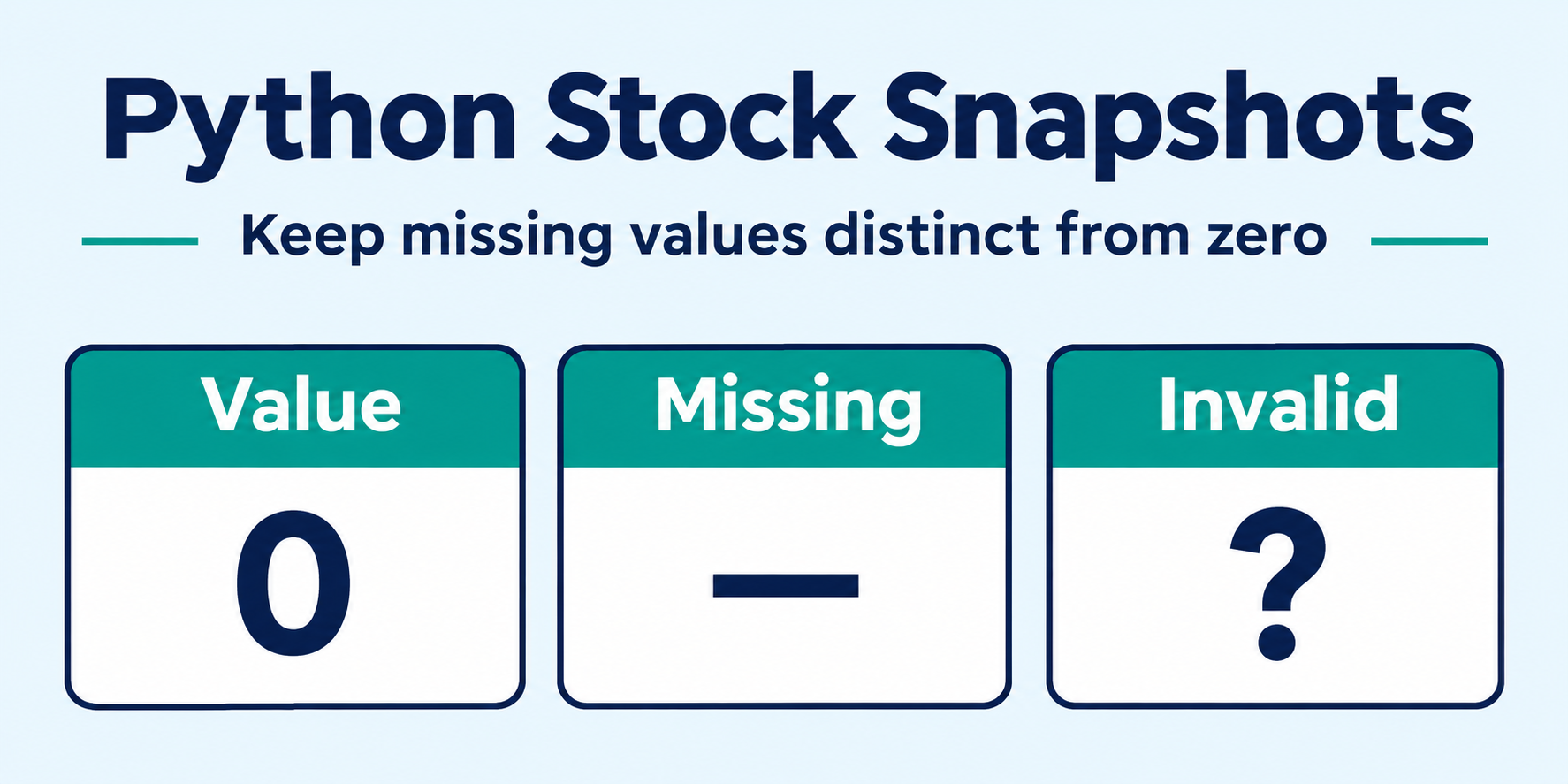
The shortcut that changes the meaning of a quote
Suppose a dashboard displays a stock price and its traded volume. If the response omits volume, row.get("volume_24h", 0) makes an unknown quantity look like a reported zero. The screen is neatly filled in, but the application has added information the source did not provide.
Build the snapshot around a small pair: a value and its parsing state. An explicit zero remains a value. An absent field remains absent. Then reconcile the response against the symbols you actually requested, so a missing row cannot silently disappear from the dashboard.
This tutorial uses TickDB’s documented REST ticker endpoint as a concrete Python integration example. It was prepared for TickDB’s publication channels. The request contract was checked against the official documentation; the parser tests use synthetic fixtures, not a credentialed market-data call or a latency benchmark.
What the request gives you
The documented ticker request is a GET request with an X-API-Key header. It accepts comma-separated symbols, up to 50 per request, and an optional type parameter. Here, type=stock makes the intended product explicit. Keep the key on a server or another trusted environment, not in browser JavaScript or a repository.
A successful HTTP status is only the first check. The JSON envelope has a business code and a data array. The example accepts integer 0 as success, then checks each quote row before building the output. It does not use the human-readable message as control flow.
Within a quote row, the documented required fields are symbol, last_price as a string, and timestamp as an integer Unix timestamp in milliseconds. Other fields are conditional on the product, trading session, and data availability. That distinction is why a compact price widget still needs a policy for missing optional values.
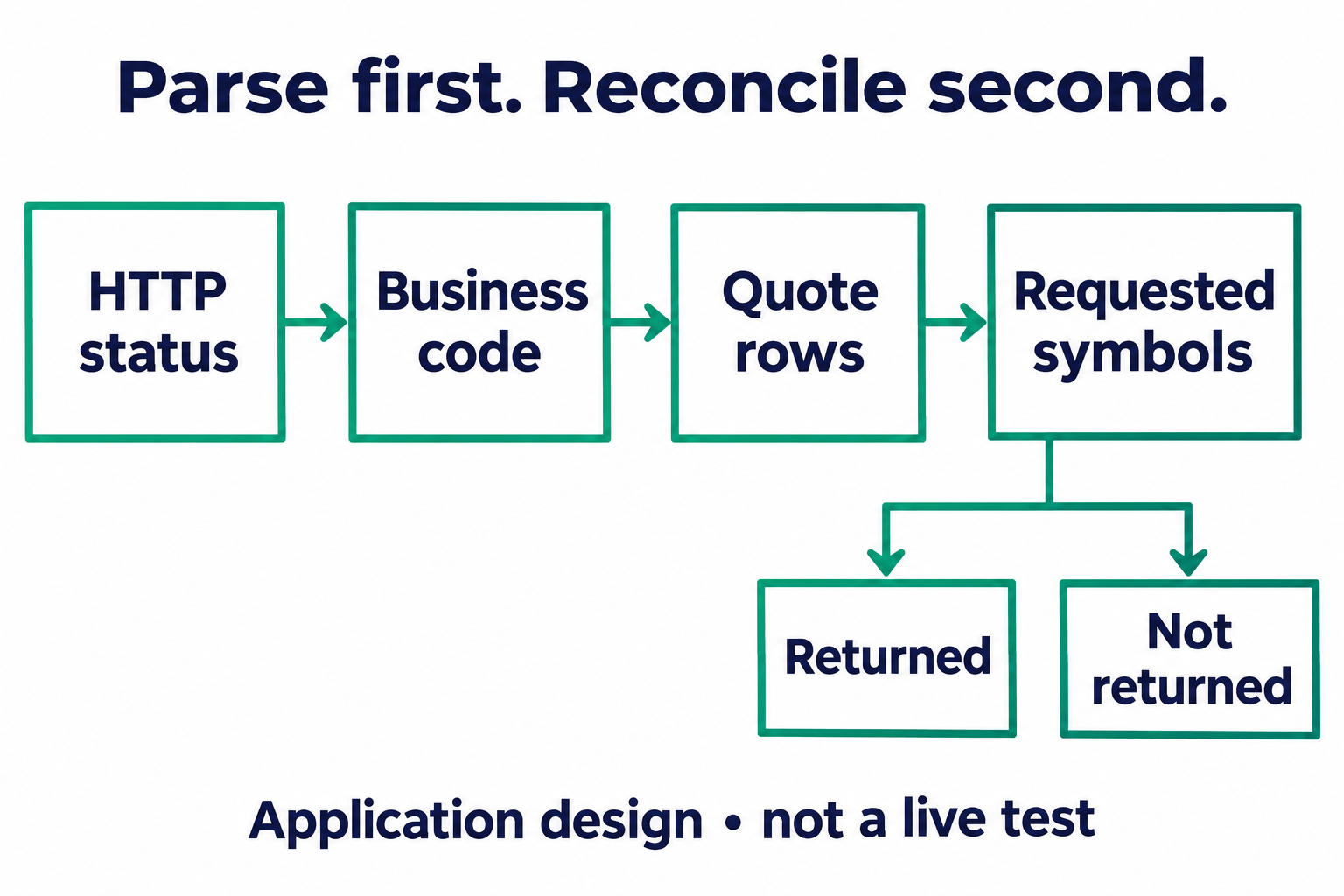
Application design, not an observed API trace. A valid response envelope still needs symbol reconciliation.
Do not pair requests and responses with zip. Even if returned rows follow the order of valid requested symbols, that does not establish that every requested symbol is present. A dictionary keyed by the returned symbol lets the application mark an omitted symbol as not_returned instead of attaching the next stock’s quote to it.
A copyable standard-library implementation
Save the following as snapshot.py and set TICKDB_API_KEY in your trusted runtime. It uses Python’s standard library, a ten-second request timeout, and the documented stock-symbol examples. Those examples are not a statement about your account’s entitlements or current quote availability.
The parser returns decimal values as strings to avoid introducing binary floating-point rounding into the display layer. It rejects booleans and non-finite numbers. A required field that cannot be parsed makes the row invalid_required; the application should not present that row as a usable current quote.
import json
import os
from decimal import Decimal, InvalidOperation
from urllib.error import HTTPError, URLError
from urllib.parse import urlencode
from urllib.request import Request, urlopen


def number_field(row, key):
    if key not in row:
        return {'state': 'absent', 'value': None}
    raw = row[key]
    if raw is None:
        return {'state': 'null', 'value': None}
    if isinstance(raw, str) and not raw.strip():
        return {'state': 'blank', 'value': None}
    if isinstance(raw, bool) or not isinstance(raw, (str, int, float)):
        return {'state': 'invalid', 'value': None}
    try:
        value = Decimal(str(raw))
        if not value.is_finite():
            raise InvalidOperation
    except InvalidOperation:
        return {'state': 'invalid', 'value': None}
    return {'state': 'value', 'value': str(value)}


def snapshot(body, symbols):
    if not isinstance(body, dict):
        raise ValueError('Malformed response envelope')
    if type(body.get('code')) is not int or body['code'] != 0:
        raise ValueError('API error or malformed business code')
    rows = body.get('data')
    if not isinstance(rows, list):
        raise ValueError('Malformed data array')
    by_symbol = {}
    for row in rows:
        if not isinstance(row, dict) or not isinstance(row.get('symbol'), str):
            raise ValueError('Malformed quote row')
        symbol = row['symbol']
        if symbol not in symbols or symbol in by_symbol:
            raise ValueError('Unexpected or duplicate symbol')
        by_symbol[symbol] = row
    result = []
    for symbol in symbols:
        if symbol not in by_symbol:
            result.append({'symbol': symbol, 'state': 'not_returned'})
            continue
        row = by_symbol[symbol]
        price = number_field(row, 'last_price')
        stamp = row.get('timestamp')
        valid_required = (isinstance(row.get('last_price'), str)
                          and price['state'] == 'value'
                          and type(stamp) is int and stamp >= 0)
        result.append({
            'symbol': symbol,
            'state': 'parsed' if valid_required else 'invalid_required',
            'last_price': price,
            'timestamp_ms': stamp if type(stamp) is int and stamp >= 0 else None,
            'volume_24h': number_field(row, 'volume_24h'),
            'bid_price': number_field(row, 'bid_price'),
            'ask_price': number_field(row, 'ask_price'),
        })
    return result


def fetch_snapshot(symbols):
    if not isinstance(symbols, (list, tuple)) or not 1 <= len(symbols) <= 50:
        raise ValueError('Use 1–50 unique symbols')
    if any(not isinstance(s, str) or not s.strip() or ',' in s for s in symbols):
        raise ValueError('Invalid symbol list')
    if len(set(symbols)) != len(symbols):
        raise ValueError('Use unique symbols')
    key = os.environ.get('TICKDB_API_KEY')
    if not key:
        raise ValueError('Set TICKDB_API_KEY on the server')
    url = 'https://api.tickdb.ai/v1/market/ticker?' + urlencode({
        'symbols': ','.join(symbols), 'type': 'stock'})
    request = Request(url, headers={'X-API-Key': key, 'Accept': 'application/json'})
    try:
        with urlopen(request, timeout=10) as response:
            if response.status != 200:
                raise RuntimeError('Unexpected HTTP status')
            body = json.loads(response.read())
    except HTTPError as error:
        raise RuntimeError(f'HTTP {error.code}; inspect policy before retrying') from None
    except (URLError, TimeoutError):
        raise RuntimeError('Request failed; no quote snapshot available') from None
    except (ValueError, UnicodeDecodeError):
        raise RuntimeError('Response was not valid JSON') from None
    return snapshot(body, symbols)


if __name__ == '__main__':
    print(json.dumps(fetch_snapshot(['AAPL.US', 'MSFT.US']), indent=2))
What each output state means
The row-level parsed state means only that the required fields passed this parser’s structural checks. It does not mean “fresh,” “complete,” or “tradable.” not_returned means the requested symbol was absent from this response, not that the security is delisted or unavailable to every account. invalid_required preserves a returned row for diagnosis while preventing it from being treated as a valid quote.
At the field level, absent, null, blank, and invalid retain different diagnostic information. Null handling is defensive application behavior; it is not a claim that the documented API normally returns null for these fields. All four states may display an em dash in a compact widget, but they should remain distinguishable in your application data. Only state == "value" should enter numeric calculations.
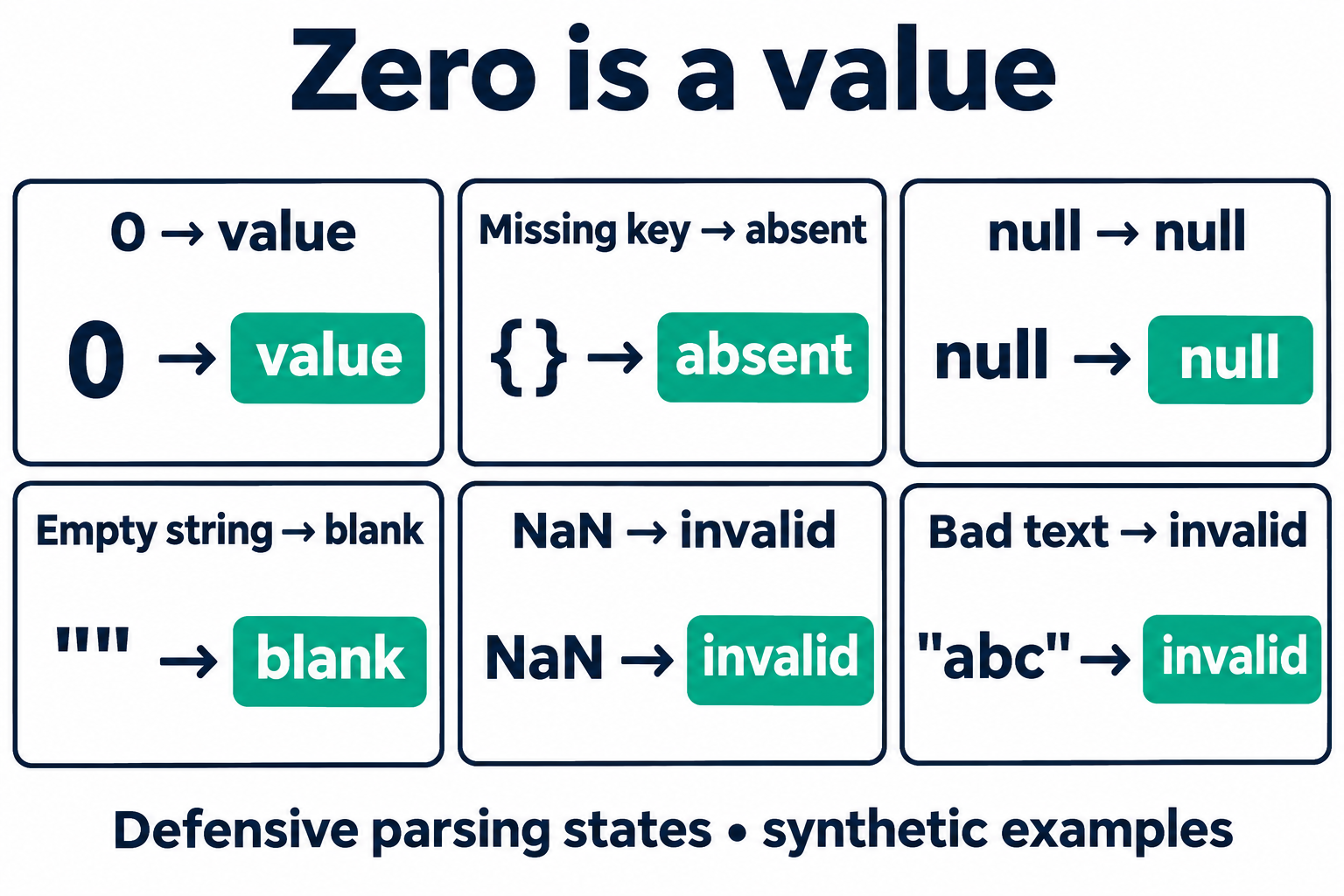
Defensive parsing states illustrated with synthetic inputs. Zero is retained; unknown values are not filled with zero.
For a small offline check, import the parser rather than running the network entry point:
from snapshot import snapshot

fixture = {"code": 0, "data": [
    {"symbol": "AAPL.US", "last_price": "123.45",
     "timestamp": 1700000000000, "volume_24h": "0"}
]}
rows = snapshot(fixture, ["AAPL.US", "MSFT.US"])
assert rows[0]["volume_24h"] == {"state": "value", "value": "0"}
assert rows[0]["bid_price"]["state"] == "absent"
assert rows[1]["state"] == "not_returned"
The price and timestamp above are invented test inputs, not a quote observation. The checks demonstrate the distinction between a returned zero, an omitted optional field, and an omitted requested symbol. They do not test authentication, account access, or the service’s live response.
Preserve meaning when you put the snapshot on screen
A field name is not a complete label. TickDB documents volume_24h as cumulative traded volume. For traditional markets it normally refers to the current trading day or session; it should not automatically become “rolling 24-hour volume” on a stock dashboard. Likewise, quote_volume_24h is traded value over the same window, not a count of quotes or the quantity available at the bid or ask. The example leaves it out rather than adding a poorly labeled metric.
Keep timestamp_ms with the price. A request finishing now does not make its quote timestamp current. If you later add request-completion time for diagnostics, store it separately. Deciding whether the quote is recent enough requires an explicit application policy and the relevant market and account context; the parser intentionally makes no freshness guarantee.
Optional bid and ask prices need the same caution. Their absence does not justify substituting the last trade price, and the ticker schema does not promise bid or ask quantities simply because prices are present. Display the fields you have, with their actual meaning.
Fail the request without manufacturing a snapshot
The network function stops on HTTP errors, request failures, malformed JSON, or an unsuccessful business code. It does not turn an error into an empty successful result, and it does not automatically retry. An empty successful data array, by contrast, yields not_returned for every requested symbol. Those are different outcomes worth keeping separate.
For production diagnostics, retain a sanitized error category and documented business code in a restricted log; never log the API key or dump all request headers. Authentication and permission failures need configuration or account investigation, not a fast retry loop. For rate limits, the official error guidance recommends respecting Retry-After. A bounded retry policy belongs outside this minimal snapshot function.
The useful boundary is modest: this code turns a documented REST response into an explicit application snapshot. Before connecting it to a UI, test omitted rows, duplicate rows, malformed required fields, and optional zero values. Keep unavailable cells visible, preserve the source timestamp, and resist filling every blank. A snapshot becomes more trustworthy when the application stops pretending it knows what the response did not say.