Connect a Stock Quote API to AI and Show the Right Quote Time on a Global Watchlist
TickDB Research ·
Connect a Stock Quote API to AI and Show the Right Quote Time on a Global Watchlist
The same lookup can return Monday quotes in China and Hong Kong, a Friday US regular quote, and a Monday US premarket quote. Use real REST and MCP payloads to decide which price to show and how to preserve its market time.
On Monday evening in Beijing, asking an assistant for Apple's current price can surface both $342.56 and $347.66. In a November 23 sample, the first was the main quote from Friday at 16:00:00 Eastern. The second was Monday premarket at 06:59:43. The user's wording determines which object to show. Include its quote time and session so the price can be interpreted. [1]
Decide what price the question calls for
A previous-close question needs the relevant regular-session data. A premarket question needs the premarket object. A general “now” question requires a display policy that accounts for the market session and tells the user what was actually returned. Preserving each price object lets one watchlist answer all three questions.
| Observation from one lookup | Price | Market-local source time |
|---|---|---|
| Kweichow Moutai, main | CNY 1,439 | Nov 23 15:00:02 Shanghai |
| Tencent, main | HKD 344 | Nov 23 16:08:22 Hong Kong |
| AAPL, main | USD 342.56 | Nov 20 16:00:00 New York |
| AAPL, premarket | USD 347.66 | Nov 23 06:59:43 New York |
These four observations come from one November 23 MCP response. They share a retrieval event; every quote has its own source time. [1]
A report date cannot substitute for a quote timestamp
Giving every row the query date can turn the Friday main quote into a Monday quote. Picking the newest object can turn a premarket value into an answer about the prior regular close. Store each price with its own source timestamp. Keep retrieval time separately for tracing when the system acquired the snapshot.
We ran two actual payloads through the same converter. In an October 22 REST archive, the AAPL main quote used a local UTC offset of -04:00; in a November 23 MCP capture it was -05:00. A fixed five-hour offset would mislabel the October observation by an hour. Use a named timezone such as America/New_York and apply it to each timestamp. The captures were on different dates and test the same structure and conversion. [1, 2]
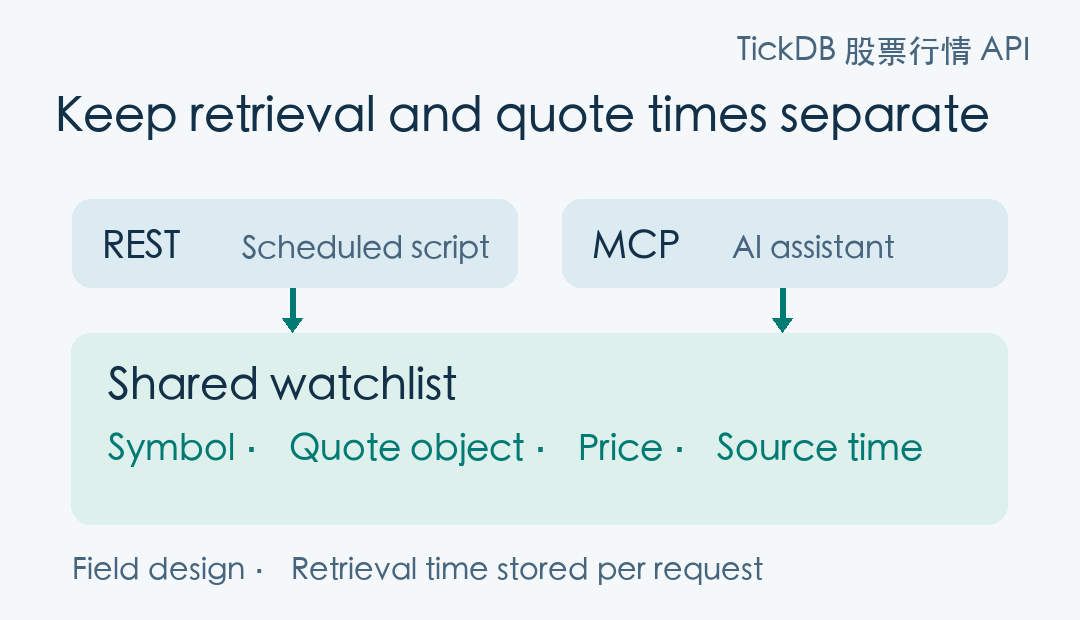
Figure 1. Keep retrieval time on the snapshot and a source time on each quote object.
Apply three checks before passing quotes to the assistant
- Use complete symbols. A scheduled application can request
GET /v1/market/tickerfrom the TickDB Stock Market Data API. An assistant can query through a connected MCP market-data tool. Join by full symbols such as600519.SH,700.HKandAAPL.US. Check the business status and returned symbols. [2, 3] - Keep main
last_priceandtimestamptogether. When extended-session objects are present, takelast_doneandtimestampfrom each object. Save symbol, quote object, currency, raw timestamp and market-local time. Maintain the currency from verified instrument metadata; this quote capture does not supply a currency field. Keep snapshot acquisition time separately. [2] - Test missing data before launch. If a symbol is absent, return an explicit missing state. If a premarket object is absent, report it. A main-quote fallback should retain its own source date and session.
This is the actual source-time conversion for the November 23 premarket observation.
from datetime import datetime, timezone
from zoneinfo import ZoneInfo

stamp = 1795435183000
source = datetime.fromtimestamp(stamp / 1000, timezone.utc)
market = ZoneInfo("America/New_York")
print(source.astimezone(market).isoformat())
The output is 2026-11-23T06:59:43-05:00. To verify the full path, ask the assistant for the previous regular close and premarket quote separately. Run the question again with the premarket object removed. The response should identify it as unavailable and label the remaining quote by its actual session.
FAQ
When should an old quote be labelled stale? Set the threshold for the display and market session. Outside market hours, check whether you have the latest eligible session first. Use a calendar or market status when identifying closures, delays or trading halts.
References
- TickDB REST three-market snapshot archive, October 22, 2026, and MCP response for the same three symbols, November 23, 2026.
- TickDB Docs, Market Ticker, for quote objects and timestamps.
- TickDB Unified Realtime Market Data API, official GitHub repository.
7 markets · 42,688 symbols
- US stocks
- 14,386
- Hong Kong market
- 3,354
- China stocks, ETFs & bonds
- 7,576
- Forex & metals
- 1,228
- Indices
- 13,960
- Futures
- 1,172
- Crypto
- 1,012