Moving a Hong Kong stock data API into Docker? Check the first quote after restart
TickDB Research ·
Moving a Hong Kong stock data API into Docker? Check the first quote after restart
Before moving a Hong Kong stock dashboard, alerting service, or risk monitor to Docker, what should count as recovery? In our local Tencent test, the first quote request returned HTTP 403. A later run returned a valid snapshot. The controlled restart command returned after 0.223 seconds, and the first quote passed validation after 1.580 seconds. It was still the previous session's quote. This article shows what to check on a weekend and what to verify again during trading.
Imagine moving your team's quote script into Docker over the weekend. The process is running and the dashboard shows Tencent at HKD 344. Before handing it over to a colleague, you need to know whether the new process fetched the right stock and whether that price fits the task.
That means checking three things separately: process recovery, a valid response for the requested stock, and a quote timestamp that meets the needs of the application. The archive shows how each check applies to this weekend test [1].
Define recovery around the application
| Application | What can go wrong | What to verify |
|---|---|---|
| Market dashboard | A cached quote remains on the screen after a restart, with its timestamp hidden. | Check the first valid snapshot fetched by the new process. Show quote time and status on the dashboard. |
| Market alerts and risk monitoring | An unchanged screen or repeated price is mistaken for a quiet market. | Verify the resumed subscription, first relevant data message, quote time, and local receipt time. Label gaps and affected symbols. |
| Quant research and session review | A fresh snapshot returns, while an earlier part of the price series is still missing. | Fix the session and adjustment basis, fill the required history, and reconcile timestamps. |
Start with the REST snapshot from the TickDB Hong Kong stock market data API to verify the symbol, price, and quote timestamp. That was the path exercised here. For continuous monitoring, the documented WebSocket ticker can stream updates. After reconnecting, resubscribe and wait for a data message for the requested stock. Use historical bars for a completed review window. To investigate a spread or a recent trade while monitoring, use the live order book, recent trades, or a trade stream you have recorded. Verify those paths separately in the target environment [3][4].
Why a successful restart can still leave the wrong quote on screen
The process started, but the first request returned 403. On November 21, 2026, two host baseline runs both returned a Tencent quote at HKD 344. The first container started, but its quote request failed with HTTP 403. A later container run used the same HTTP client version as the host and received HTTP 200 with business code 0. Timing also changed between runs, so these observations cannot isolate the cause. A process-only check would have marked the first run ready [1].
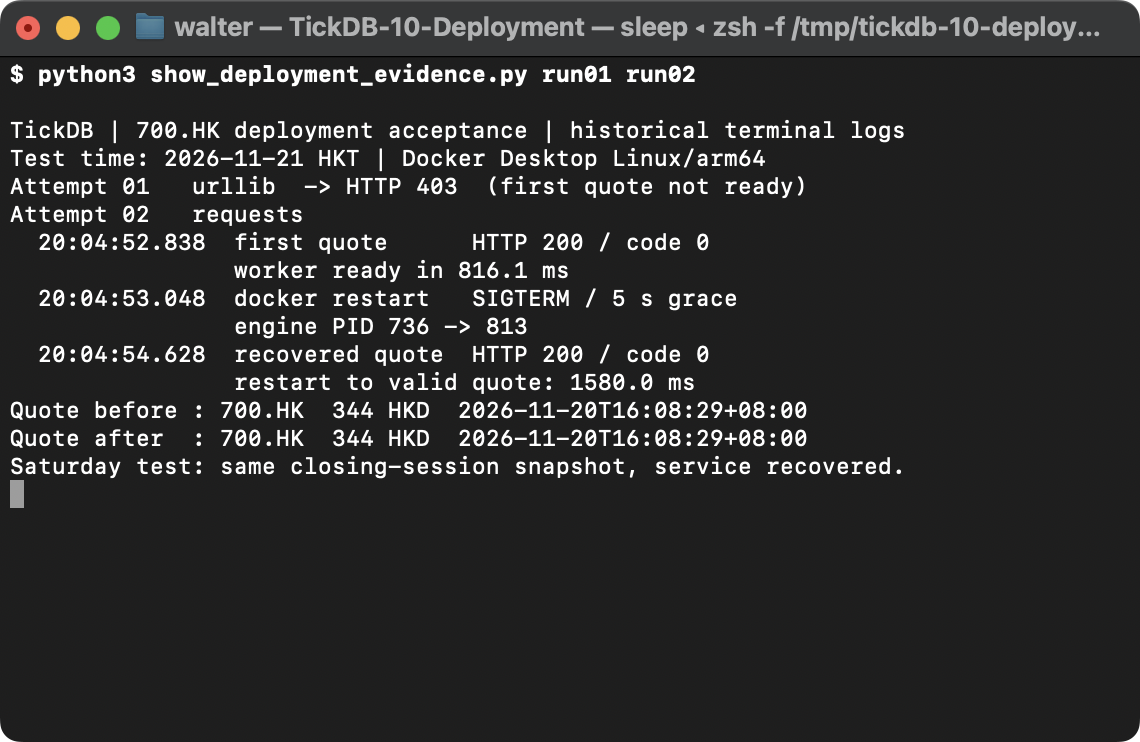
Terminal view of the archived local Docker test on one symbol on a Saturday [1].
The restart command returned before the new process delivered a valid quote. The command was issued at 20:04:53.048 and returned at 20:04:53.271, Hong Kong time. Docker reported a new container PID, and the worker had a new run ID. The first quote passed the business checks at 20:04:54.628. The two measurements start at the same point. One measures the restart command, and the other measures when a valid response reaches the application check [1][5].
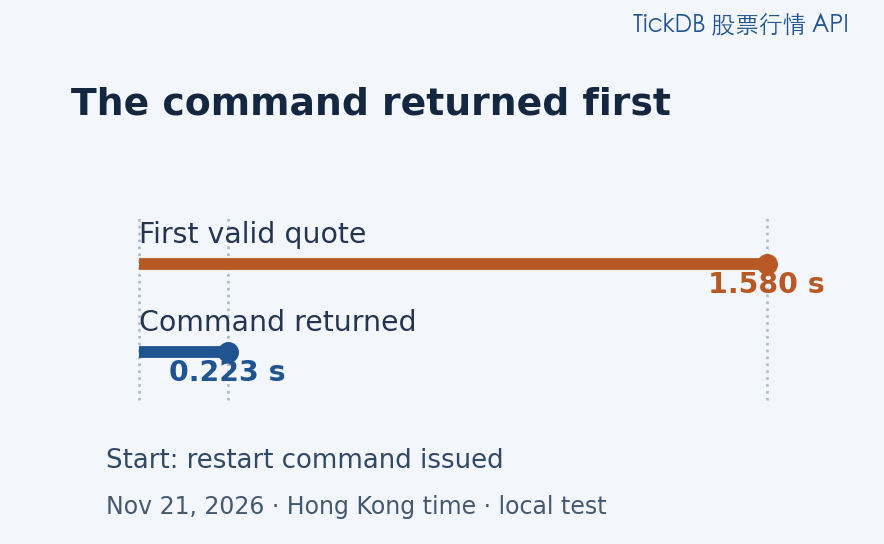
Elapsed time from the archived logs. The 1.580 seconds describes one local run [1].
A newly fetched response can still carry a previous-session quote. The files captured before and after restart were byte-for-byte identical. Both carried HKD 344 and a quote timestamp of November 20 at 16:08:29 Hong Kong time. Saturday's deployment check expected that previous-session snapshot. In live monitoring, use the local receipt time and the timestamp in the payload to check the quote age your application can tolerate [1][2][3].
This is why the dashboard should report both the worker's status and the quote's status. A recovered worker may be able to display a labeled prior-session quote immediately. A live risk check needs the required symbols, session, and quote age before treating the input as current.
How to verify the migration
- Save a baseline. Record the symbol, market, endpoint, expected trading date, HTTP client version, and validation rules. Save an original response. Keep credentials in your environment's secure configuration and out of logs.
- Verify the process and payload on the weekend. Start the timer when issuing the restart command. Separately record command return, new process identity, and the first valid response. Check HTTP and business codes, the requested symbol, price, and expected quote date. A date mismatch should be recorded before proceeding.
- Run both environments during the same trading window. Log the first data message, session, quote timestamp, and local receipt time. For WebSocket, resubscribe after reconnecting and wait for the requested symbol [4]. Record backwards timestamps, stale quotes, acknowledgement-only responses, and missing symbols. If the price stays the same, check the timestamps and available trade evidence before deciding whether the feed has stalled.
- Recover the missing data for the task. For a chart, use completed historical bars to check the gap. Merge by symbol, interval, and timestamp. Run the merge again to check for duplicates. Record any missed live alert separately. Keep a clear condition for falling back to the original environment.
Replay the recorded snapshot checks offline
The accompanying script reads saved JSON files. It checks the business code, unique symbol match, valid price, and expected quote date. HTTP status and recovery timing come from the run logs.
python3 check_hk_quote.py 700.HK 2026-11-20 复算样本/before.json 复算样本/after.json
Actual output:
before.json: PASS 700.HK 344 2026-11-20T16:08:29+08:00
after.json: PASS 700.HK 344 2026-11-20T16:08:29+08:00
Use your own symbol and expected date for the next test. Add the run ID, quote time, local receipt time, and reason for a failed check to your handover record.
FAQ
Why can identical responses still demonstrate recovery? The new container PID, worker run ID, and newly validated response show that the replacement process retrieved the expected snapshot. Continuous live updates require a separate trading-session test.
How old is too old for a quote? Set the acceptable quote age for each use case before testing. Use a live window to distinguish a closed session, an inactive symbol, delayed delivery, and missing data.
Can we set a recovery target of 1.580 seconds? Measure several runs in your target environment first. This number came from one controlled restart on local Docker Desktop with one stock on a weekend.
References
- TickDB Docker deployment test archive, November 21, 2026. Host baseline, container logs, restart events, and two recorded snapshots.
- Hong Kong Exchanges and Clearing, Securities Market FAQ, securities trading hours.
- TickDB developer documentation, Ticker Snapshot, REST fields and timestamps.
- TickDB Hong Kong stock market data product page and Best Practices, quotes, order book, trades, historical bars, and WebSocket resubscription. The local experiment exercised the REST snapshot.
- Docker Docs, docker container restart, scope of the restart command. The timings are from the local test.
7 markets · 42,687 symbols
- US stocks
- 14,386
- Hong Kong market
- 3,353
- China stocks, ETFs & bonds
- 7,576
- Forex & metals
- 1,228
- Indices
- 13,960
- Futures
- 1,172
- Crypto
- 1,012