Export Python Stock Candles to CSV Without Losing the Query Context
TickDB Research ·
A stock candle CSV is easy to download and surprisingly easy to misread a week later. A file called AAPL.csv cannot tell you whether its bars are daily or minute, adjusted or raw, or whether the API returned the whole window. Export two files together: the candles as CSV and a manifest recording the request, the series actually returned, and the exact CSV bytes.
Record the request and the response separately
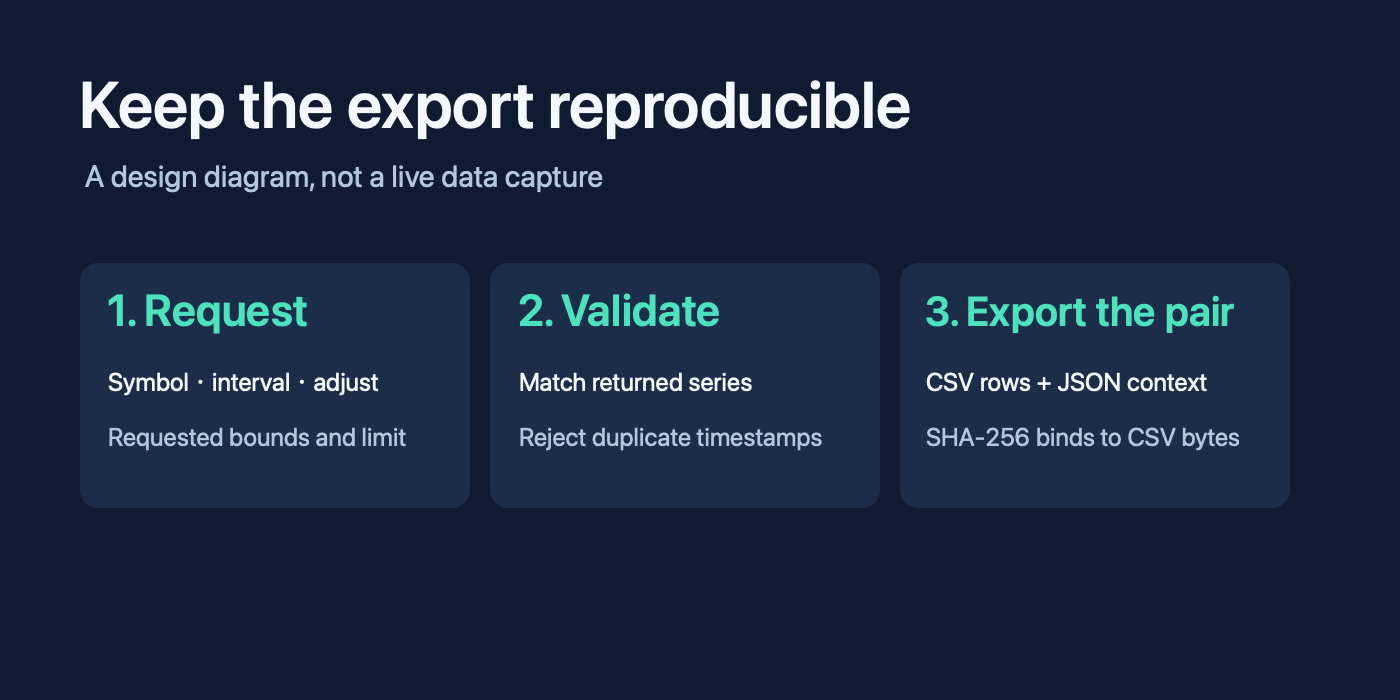
The request describes what you intended to download. Keep the full symbol, asset type, interval, price adjustment, limit and any requested time bounds. Store a UTC time for the capture, and don't send the API key to the browser or include it in the manifest.
The response says what you actually received. TickDB's Candlestick Data endpoint returns the applied symbol, asset type, interval, and adjustment alongside its bars. Compare these fields with the request before writing the export. If you asked for unadjusted daily bars and received adjusted minute bars, reject the export instead of silently naming it after the requested series.
Keep uncertainty visible
- Window: Record row count and the earliest and latest returned labels. A request for ten records returning eight does not prove why two are absent, and a response returning ten does not prove complete coverage.
- Time: Preserve the original integer millisecond labels in the CSV. Format times separately in the UI. A UTC timestamp does not, by itself, identify an exchange session or an exchange-local trading date.
- Missing fields: A blank volume is not zero. Ignore neither the missing field nor the distinction when you import the file.
- Finality: A recent candle can be provisional. If you cannot establish that a bar is final or that the window is complete, keep those states explicit rather than deriving them from row count or retrieval success.
A Python export you can check later
The sample requests ten unadjusted daily AAPL bars and writes a CSV plus a matching JSON manifest. The standard-library example needs a TickDB key in the server environment to make the request. The local checks below use synthetic payloads; they do not establish an account's permissions, the live feed's completeness, or an exchange timetable.
import csv, io, json, hashlib, os
from datetime import datetime, timezone
from urllib.parse import urlencode
from urllib.request import Request, urlopen

ENDPOINT = "https://api.tickdb.ai/v1/market/kline"
QUERY = dict(symbol="AAPL.US", type="stock", interval="1d", adjust="none", limit=10)
FIELDS = ("time", "open", "high", "low", "close", "volume")

def export(payload, query, pulled_at):
    if payload.get("code") != 0:
        raise ValueError("provider returned a business error")
    data = payload["data"]
    applied = {k: data[k] for k in ("symbol", "type", "interval", "adjust")}
    if any(query[k] != v for k, v in applied.items()):
        raise ValueError("response series does not match export request")
    bars = data["klines"]
    times = [row["time"] for row in bars]
    if any(type(t) is not int for t in times) or len(times) != len(set(times)):
        raise ValueError("invalid or duplicate bar timestamps")
    f = io.StringIO(newline="")
    writer = csv.DictWriter(f, fieldnames=FIELDS, lineterminator="\n")
    writer.writeheader()
    for row in sorted(bars, key=lambda r: r["time"]):
        writer.writerow({k: row.get(k) for k in FIELDS})
    content = f.getvalue().encode("utf-8")
    manifest = dict(request=query, applied=applied, queried_at_utc=pulled_at,
                    returned_rows=len(bars), first_ms=min(times, default=None),
                    last_ms=max(times, default=None), completeness="not established",
                    last_bar_finality="not established",
                    sha256=hashlib.sha256(content).hexdigest())
    return content, manifest

if __name__ == "__main__":
    from pathlib import Path
    req = Request(ENDPOINT + "?" + urlencode(QUERY),
                  headers={"X-API-Key": os.environ["TICKDB_API_KEY"]})
    with urlopen(req, timeout=20) as response:
        payload = json.load(response)
    now = datetime.now(timezone.utc).isoformat()
    content, manifest = export(payload, QUERY, now)
    Path("bars.csv").write_bytes(content)
    Path("bars.manifest.json").write_text(json.dumps(manifest, indent=2)+"\n")
Verify the handoff
Treat the two files as a pair. Recompute SHA-256 over the CSV bytes and compare it with the manifest before importing the result. A mismatch means the files no longer correspond; a match proves byte identity, not market-data accuracy. Keep a distinct export ID for each capture in a production downloader rather than overwriting a prior pair.
In the synthetic checks, out-of-order rows are sorted, missing volume stays blank while an explicit zero survives, the row count and digest match, and a different adjustment, different interval or duplicate timestamp is rejected. An empty response exports only the header and records no returned time bounds. It does not assert that the market was closed.
For the downloader in a stock dashboard, the practical rule is simple: export the data and what you know about it, not just what the chart happens to show.
Source checked: TickDB REST API documentation, Candlestick Data and Latest Candlesticks.
7 markets · 42,687 symbols
- US stocks
- 14,386
- Hong Kong market
- 3,353
- China stocks, ETFs & bonds
- 7,576
- Forex & metals
- 1,228
- Indices
- 13,960
- Futures
- 1,172
- Crypto
- 1,012