Hong Kong Stock API: How to Check a Trade Against the Order Book After the Close
TickDB Research ·
Hong Kong Stock API: How to Check a Trade Against the Order Book After the Close
When a trade and the best ask show the same price on your Hong Kong watchlist after the close, start with the timestamps. In three actual Tencent API responses, the latest price, most recent trade and best ask all showed HK$337.40. The book was stamped nearly five hours after the trade. Use the checklist below to spot the same mismatch on your own dashboard.
Imagine opening your watchlist in the evening to review a Tencent trade from the afternoon. The trade price and the best ask both read HK$337.40, so it is tempting to use the bid and ask on screen to calculate the spread at the time. Putting the three response timestamps side by side exposed the mismatch.
The trade was stamped 16:08:03 and the book was stamped 21:03:46.199, nearly five hours later. These records give us the price and size of the trade. For the bid and ask available at the time, rule out this book.
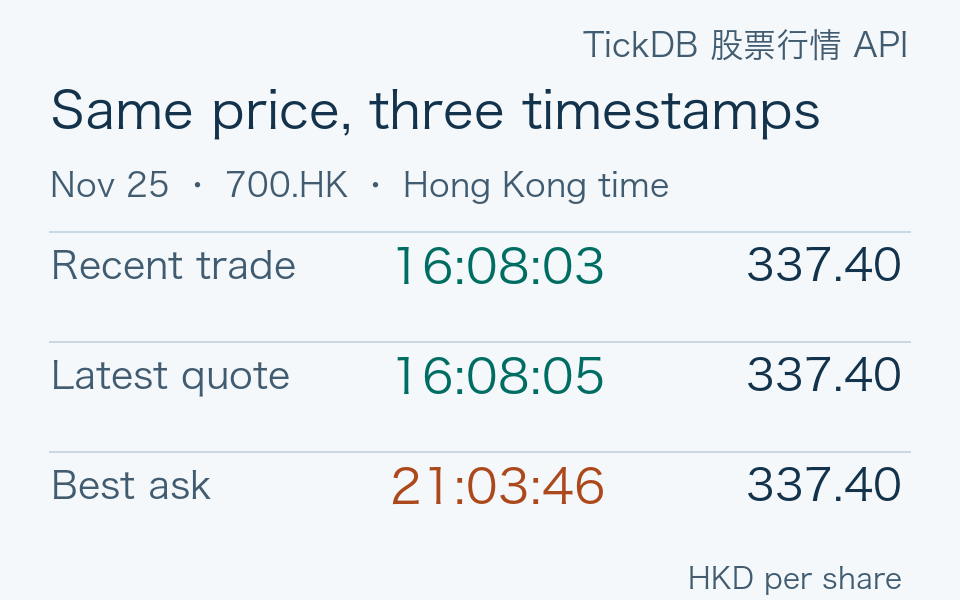
Tencent Holdings (700.HK), November 25, 2026, Hong Kong local time. The times are shown to the second. “Latest quote” is the snapshot’s latest-price field. All three values are from actual TickDB responses.
Why the same price shows up three times
The latest price gives you a quick read on the watchlist. The quote snapshot was stamped 16:08:05 and showed HK$337.40. The most recent trade shows an execution that has already happened. At 16:08:03 the trade response recorded 1,521,600 shares at HK$337.40. The best ask is the lowest sell price in the book observation. The book stamped 21:03 showed a best bid of HK$337.20 and a best ask of HK$337.40, a spread of HK$0.20 for that observation.
To calculate the spread around a trade, take the bid and ask from the same book observation and check whether it was visible at the time. Copying the 21:03 book onto the 16:08 trade would add a precise-looking spread with no underlying book evidence for that point in time.
HKEX lists a separate closing auction session on full trading days. When reviewing trades near the close, check which session they belong to. The timestamps suffice to rule out the evening book in this example. Identifying the mechanism of the trade would take a relevant trade flag or another record.
Run the same check on your own watchlist
Choose the trade, then find book observations for the same instrument, market and relevant session. Check what each timestamp represents and put them in the same time zone. Start with the closest book observation before the trade and within your preset tolerance. If the timestamps match, check whether the records reliably show the book came first. Leave the match blank if the order is unknown. To reconstruct your own screen, also check when the book arrived and appeared on it.
| What to record | Result for this example |
|---|---|
| Instrument and session date | 700.HK · 2026-11-25 |
| Trade time and price | 16:08:03 · HK$337.40 |
| Candidate book timestamp | 21:03:46.199 |
| Match result | Reject. The book timestamp is after the trade |
| Bid, ask and spread at the trade | No qualifying book in this sample. Leave blank |
Replace the second column with your own records. For illustration, suppose you saved another comparable book observation stamped 16:08:01 and set a five-second tolerance. It is two seconds before the trade, so it is a candidate. Check which session it belongs to before using it. Set the tolerance to suit the precision your review needs.
What goes on the watchlist and in the detail view?
With TickDB, use a batch quote snapshot for the symbols on the watchlist, displaying each latest price with the accompanying timestamp. Open a symbol to inspect actual trades and the order book separately. Save each response timestamp alongside the local receive time. The watchlist stays easy to scan, the detail view keeps trades and quotes distinct, and your review table shows where a record is missing. TickDB Hong Kong stock market data API
FAQ
Why do simultaneous requests return different timestamps?
The request time is when you asked. The timestamp in each response belongs to its own record. A recent-trade request may return an earlier execution. Keeping both the record timestamp and local receive time lets you investigate the difference later.
Can I retrieve the book at the trade time the next day?
Start with your own archive or historical depth covering that time. Check instrument, session, time order and tolerance. If no observation qualifies, mark the historical book as missing and leave its bid, ask and spread blank.
References
- Hong Kong Exchanges and Clearing, Securities Market Trading Hours, full-day closing auction session.
- TickDB OpenAPI and the November 25, 2026 quote snapshot, recent-trades and depth responses for Tencent Holdings (700.HK).
This Week's Offer

TickDB Black Friday subscription week ends at 23:59 Beijing time on November 29, 2026. Save 15% on a six-month subscription and receive an additional half month. Save 20% on an annual subscription and receive an additional month. New paid subscriptions and renewals are eligible.
Category coverage
- Hong Kong market
- 3,354
- Of which equities
- 2,973