U.S. Trading Calendar API: How to Schedule After-Close Backfills on Holidays and Early Closes
TickDB Research ·
U.S. Trading Calendar API: How to Schedule After-Close Backfills on Holidays and Early Closes
When scheduling U.S. stock reports or minute-bar backfills, skip confirmed closures, adjust the window on early-close days, and flag failed calendar checks for review. Using an actual calendar response and the 2026 Thanksgiving exchange schedules, we calculate the 210-minute window for November 27 and lay out four scheduling states you can implement.
If your backfill always runs after 16:00 New York time, it will run needlessly on Thanksgiving. The next day has a regular equity session, but it closes at 13:00. Keeping the usual schedule adds three hours of waiting. If your validation still expects a full session window, it will also flag 180 minutes when the regular session was never scheduled to trade.
Check two things separately. First establish whether the job should run and when the session ends. Then check whether the data for that window has arrived. For this early close, moving the boundary from 16:00 to 13:00 reduces the scheduled validation window from 390 minutes to 210.
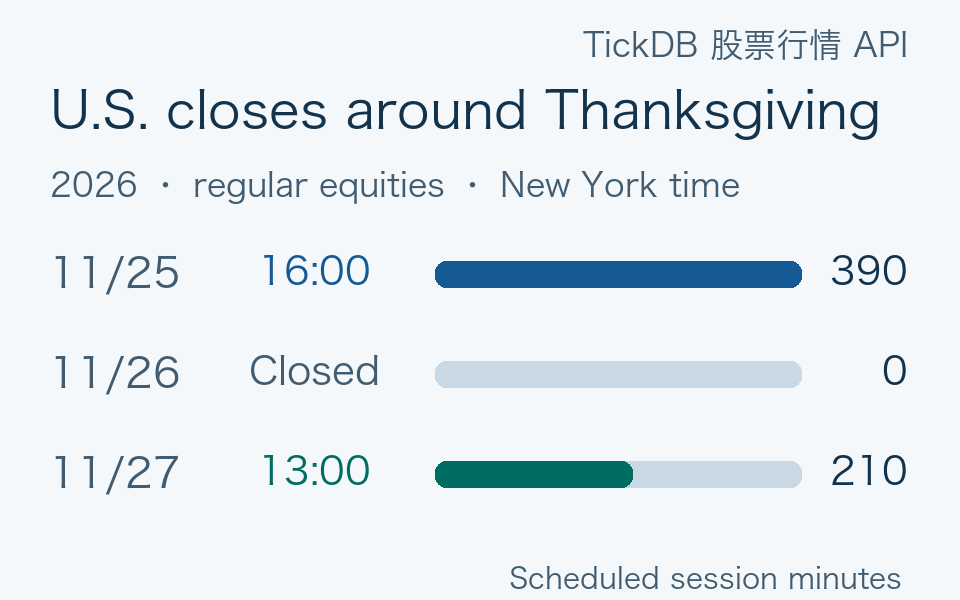
2026, New York local time. The chart shows scheduled window lengths, based on the NYSE and Nasdaq holiday schedules and TickDB's general trading sessions.
Check the trading date, then confirm the session close
We queried November 23–30, 2026. Here is the minimal request. Include X-API-Key as documented when making the call.
GET /v1/market/trade-days?market=US&beg_day=20261123&end_day=20261130
The response returned code=0 and market=US. The trade_days list contained November 23, 24, 25 and 30. The half_trade_days list contained November 27. Neither list included November 26, matching the NYSE and Nasdaq holiday schedules. The API identifies November 27 as a half-day. Use the exchanges' schedule to confirm the 13:00 regular equity close. The general trading session of 09:30–16:00 supplies the ordinary-day template.
| New York session date | Regular equity close | Scheduled window |
|---|---|---|
| November 25 | 16:00 New York → 05:00 Beijing next day | 390 min |
| November 26 | Closed. Skip this date | — |
| November 27 | 13:00 New York → 02:00 Beijing next day | 210 min |
02:00 Beijing time the following day is the close boundary. The backfill itself should trigger after a suitable buffer or a feed-readiness check. The 210 minutes are a scheduled duration. Verify the actual bars after the session.
Give the scheduler four states
Check HTTP success, the business code, the market, both date arrays and whether the original request covers the target date. Read that date range from the request you saved. A failed or incomplete lookup should leave the date pending verification.
| State | What the job does |
|---|---|
| Ordinary session | The date appears only in the full-day list and schedules agree. Use regular hours and start once the feed is ready |
| Confirmed closure | The date is in neither list and the exchange confirms closure. Skip and record the source |
| Early close | The date appears only in the half-day list and the exchange confirms the exact close. Recalculate the backfill window |
| Needs verification | Calendar request failed, the date is out of range or in both lists, the closure is unconfirmed, sources disagree or the half-day close is missing. Keep the job pending and flag it for review |
Store the session date in New York local time. Create the session boundaries in America/New_York, then convert them to the scheduler's time zone. For November 27, the 13:00 close becomes 18:00 UTC that day or 02:00 Beijing time the following day. November 27 remains the session date, even for a weekend retry.
Reconcile the right window after the close
Use TickDB's trading calendar to classify dates and its general sessions to configure ordinary hours. Add the exchange's exact boundary for exceptional sessions. Query historical bars over that confirmed interval after the close. Keep the request, valid response and job result together so you can tell whether a gap came from scheduling or missing observations. TickDB U.S. stock market data API
Before building the expected set of minute labels, check the bar convention and boundary rules, and whether your feed is expected to return a bar for that symbol in a minute without trades. For example, if bars are start-labelled and the regular session is validated from 09:30 up to but excluding 13:00, the last expected minute label is 12:59. Compare the returned timestamps with the labels expected for that symbol. Count missing, duplicate and out-of-window records separately.
Reuse the same session window on retries. Within one job configuration, identify a run by market, session date and job type. Add a job ID if you maintain several lists or configurations. Deduplicate bars by symbol, interval and timestamp within the same source and price convention, then reconcile again. The next time a market closes early, adjust the window first and see which minutes are actually missing.
FAQ
Can I hard-code 13:00 for every half-day?
Check the exchange, product and date in the published schedule. This example uses the regular equity close on November 27, 2026.
Can I treat a failed calendar lookup as an ordinary session?
Flag automatic scheduling for verification. If you have an approved backup calendar, check it under your existing policy and record its source. Resume that day's plan once the session date and boundary are confirmed.
References
- NYSE, Holidays & Trading Hours, and Nasdaq, 2026 U.S. Stock Market Holiday Schedule.
- TickDB trading calendar and general trading sessions documentation, plus the November 23–30, 2026 U.S. calendar response.
This Week's Offer

TickDB Black Friday subscription week ends at 23:59 Beijing time on November 29, 2026. Save 15% on a six-month subscription and receive an additional half month. Save 20% on an annual subscription and receive an additional month. New paid subscriptions and renewals are eligible.
Category coverage
- US stocks
- 14,809