Free Forex Data API: Test Quote Access and Rate Limits Before You Build
TickDB Research ·
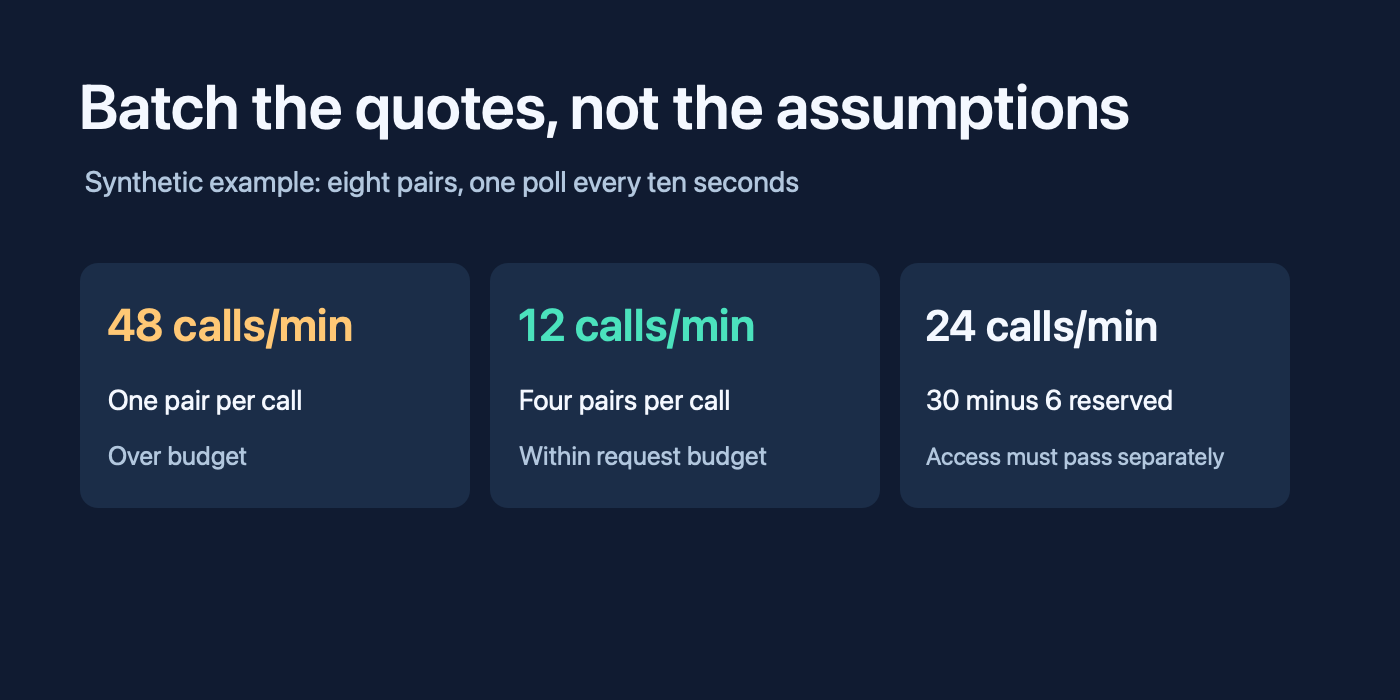
A free forex data API can be enough for a small quote dashboard, but only if the trial returns the pairs and fields you need and your refresh loop fits inside its limit. With eight pairs refreshed every ten seconds, one request per pair takes 48 calls per minute. Four pairs per request bring that down to 12. Batching solves the request-count problem, not the permissions problem.
Prove the trial covers your quotes
Write down the exact pairs, maximum useful quote age, and fields your screen needs. A last-price chart and a bid/ask panel have different requirements. If the panel needs both sides, a response with only a last price doesn't pass. Don't substitute last price for a missing bid or ask. Also distinguish indicative feed quotes from prices at which your broker would execute an order.
Start with a single documented symbol, then send the exact dashboard batch. Compare the set of returned symbols with what you requested. A successful HTTP response can still be missing a symbol or a field; record missing data explicitly rather than displaying a stale value as live. For each returned quote, check the provider's timestamp unit, then compare age with your app's cutoff during the session you intend to cover. A timestamp that doesn't change in a quiet market isn't proof of an outage.
TickDB's public forex page describes a seven-day trial for selected symbols and lists 30 API requests per minute. Its ticker docs describe multi-symbol queries and a maximum of 50 symbols per request. Those are documented limits, not evidence that every pair is available to your trial. The docs also say some fields depend on product, session and data availability. Check the fields in your own returned rows before committing to the feed.
Turn the refresh interval into a request budget
Count calls across the whole application, not just one widget. If several clients poll the same universe, share a backend cache where your provider's terms permit it. Otherwise each client can consume the quota again. Keep room for retries and other endpoints, and verify how the provider counts requests across credentials, endpoints and connections.
The example below estimates scheduled peak calls for a simple aligned loop. It reserves six calls out of 30 and rounds up the number of poll opportunities in 60 seconds. It does not simulate burst limits, rate-limit windows or WebSocket capacity.
from math import ceil

def poll_budget(pairs, seconds, symbols_per_call, limit, reserve=0):
    """Conservative aligned-poll budget for a 60-second window."""
    if not all(type(n) is int for n in (pairs, seconds, symbols_per_call, limit, reserve)):
        raise ValueError("Use integer inputs")
    if min(pairs, seconds, symbols_per_call, limit) <= 0 or not 0 <= reserve < limit:
        raise ValueError("Invalid workload or reserve")
    calls = ceil(pairs / symbols_per_call) * ceil(60 / seconds)
    usable = limit - reserve
    return calls, usable, calls <= usable

if __name__ == "__main__":
    assert poll_budget(8, 10, 1, 30, 6) == (48, 24, False)
    assert poll_budget(8, 10, 4, 30, 6) == (12, 24, True)
    assert poll_budget(8, 10, 2, 30, 6) == (24, 24, True)
    assert poll_budget(8, 7, 2, 30, 6) == (36, 24, False)
    try:
        poll_budget(8, 0, 4, 30)
    except ValueError:
        pass
    else:
        raise AssertionError("zero-second interval was accepted")
    print("5 synthetic checks passed; no network calls")
Run three checks before you upgrade
- Access: Try the exact pair list. Fail the test if a required symbol is absent, its essential field is missing, or entitlement is unclear.
- Freshness: During a representative session, log quote time and local receive time separately. Test the app with an intentionally stale sample so you know it stops calling that quote live.
- Recovery: In a controlled test, inject a rate-limit response. Check that the poller backs off instead of immediately replaying the entire batch; respect a server retry hint if one is returned. Distinguish that case from permission denial, which repeating the request will not fix.
The arithmetic was verified against five local synthetic cases; no live forex feed, entitlement or production latency was tested. A trial is adequate for the prototype only if those three checks pass for your actual workload. Before production, separately verify the ongoing price and terms for storing or displaying the data to your users.
Sources checked November 25, 2026: TickDB Forex Market Data API and TickDB Ticker REST reference.
7 markets · 42,688 symbols
- US stocks
- 14,386
- Hong Kong market
- 3,354
- China stocks, ETFs & bonds
- 7,576
- Forex & metals
- 1,228
- Indices
- 13,960
- Futures
- 1,172
- Crypto
- 1,012