US stock kline API: How to check batch downloads for missing and duplicate bars
TickDB Research ·
US stock kline API: How to check batch downloads for missing and duplicate bars
How do you verify coverage after downloading US daily bars in batches? A complete AAPL response contained 15 bars. The same window with
limit=2returned the final two. Splitting the 15 bars offline produced either an extra row or a missing date at the boundary. Here is how to distinguish those cases and check your downloaded batches against a trading calendar.
You backfill daily US stock bars in two batches. Both jobs finish successfully. Compare the results with the expected trading dates. If you got only the last few dates, check the request limit first. If a date is missing or repeated where the batches meet, check the boundaries and merge. Archived AAPL responses illustrate the difference.
If all you got was the tail, check the request limit
The complete TickDB response for October 26 through November 13, 2026 contained 15 unadjusted AAPL daily bars (adjust=none). With the same window and limit=2, the response contained only November 12 and 13. Check HTTP and application-level success, then verify the instrument, interval and adjustment setting. Next, compare the dates with the ones you expect.
If the problem is at the boundary, check both sides before merging
We queried the October 30 bar with both endpoints set to its exact timestamp and got one bar. Moving both endpoints back one millisecond returned zero. That is what we observed for this instrument and configuration. Run a short boundary check of your own when you change instruments or intervals.
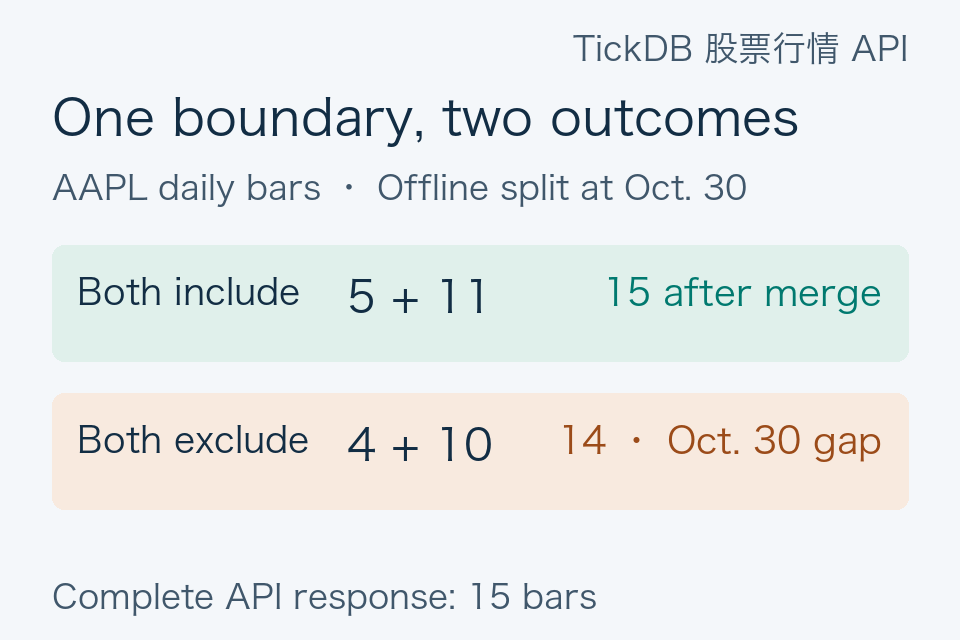
We then split the 15 archived bars offline at October 30. Including the date in both batches gave us 5 plus 11 rows. The two October 30 records matched field for field, and merging them produced the original 15 bars. Dropping the date from both batches gave us 4 plus 10 rows. The result had no duplicates and still missed October 30.
Check the two batches you actually received
Start with two separate inputs. Build the expected dates from the trading calendar, accounting for listings, suspensions and coverage. Then use the records returned to your client. In this example, we convert AAPL's millisecond timestamps to New York time before taking the full calendar date. Use batches with matching instrument, interval and adjustment settings.
from collections import Counter
from datetime import datetime
from zoneinfo import ZoneInfo

NY = ZoneInfo("America/New_York")

def bar_dates(reply):
    if reply["code"] != 0:
        raise ValueError("K-line request failed")
    return [
        datetime.fromtimestamp(bar["time"] / 1000, NY).date().isoformat()
        for bar in reply["data"]["klines"]
    ]

def audit_dates(expected_dates, batches):
    expected = set(expected_dates)
    if not expected:
        raise ValueError("Expected trading dates are required")
    counts = Counter(day for batch in batches for day in batch)
    return {
        "missing": sorted(expected - counts.keys()),
        "duplicate": sorted(day for day, n in counts.items() if n > 1),
        "extra": sorted(counts.keys() - expected),
    }
Pass each parsed API response to bar_dates, then give the resulting date lists to audit_dates. For a small, intentionally incomplete example, use ["2026-10-29", "2026-10-30", "2026-11-02"] as expected dates and [["2026-10-29"], ["2026-11-02"]] as the batches. The check should report October 30 as missing, with both duplicate and extra empty.
When two rows share an instrument, interval, adjustment setting and timestamp, compare their open, high, low, close and volume. Merge matching records and retain conflicting values for review. The code here checks dates. Check conflicting prices separately. Start with a short TickDB historical-bar window and reconcile it with your calendar before extending the backfill. TickDB US Stock Market Data API
FAQ
Should I retry immediately if one trading date is missing? First check whether you expect a bar for that instrument on that date. If it is where two batches meet, see whether both windows excluded it, then try a narrow query.
References
- TickDB Kline API documentation, date range, count limit and adjustment parameters.
- Frozen TickDB AAPL daily bar responses, complete window,
limit=2and both point queries.
This week's offer

TickDB Black Friday Subscription Week runs November 23–29, 2026, ending at 11:59 p.m. Beijing time. Save 15% on semiannual billing and get half a month extra, or save 20% on annual billing and get one month extra. The offer applies to new paid subscriptions and renewals. The extra time is added automatically after payment.
7 markets · 42,688 symbols
- US stocks
- 14,386
- Hong Kong market
- 3,354
- China stocks, ETFs & bonds
- 7,576
- Forex & metals
- 1,228
- Indices
- 13,960
- Futures
- 1,172
- Crypto
- 1,012