Free Stock Market Data API: A Quote Does Not Prove Trade or Depth Access
TickDB Research ·

A free stock API trial can be enough to prototype a quote widget. It is not evidence that the same key can retrieve executed trades or order-book depth. Test each feature with the same key and a single permitted stock. Keep the results separate so one successful request cannot mask a missing feed.
Decide which data the feature needs
A last-price tile needs a price and a timestamp. A tape of recent executions needs individual trades. A book display needs bid and ask levels with sizes. These are different payloads. You cannot recreate the sequence of fills or the resting orders from a last price, even if that price is fresh.
TickDB illustrates the distinction at the plan level. Its pricing page describes Free as a seven-day trial for selected symbols, including real-time quotes and K-line data. Its REST ticker reference lists Free access for selected symbols; the order-book and tick-by-tick trades references do not list Free access. A successful ticker request on a trial key is consistent with that documentation. It does not establish permission for the other two endpoints or for every symbol. These are documented plan terms checked on November 29, 2026, not results from a live account test.
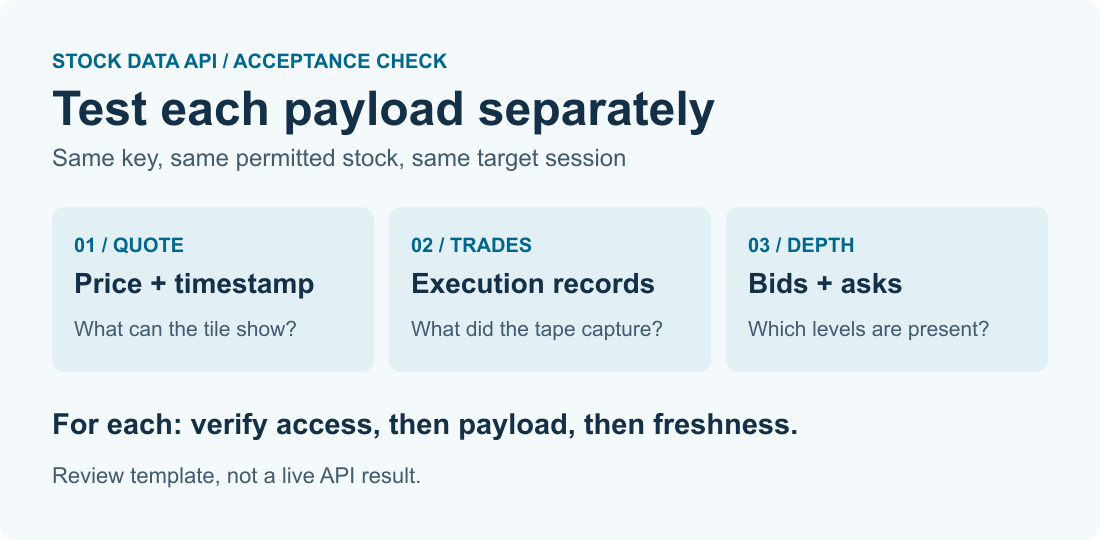
Figure 1. A review template, not a screenshot or a live entitlement test.
Separate permission, response shape and freshness
Test during the session you intend to support. Start with a symbol you know your key can read. A quiet tape may be valid outside market hours, and a thin book may return fewer levels than the venue supports. Record three things separately: whether the key had access, whether the expected payload showed up for the requested symbol, and whether timestamps met your own freshness threshold for that session.
For example, a quote with a valid timestamp can pass the shape check and still be too old for your widget. Conversely, a rate-limited request tells you nothing about whether the plan includes the endpoint. Defer and retry within the provider's policy instead of marking it denied. An empty array also needs a separate outcome: it is neither permission denied nor proof that the feature has usable data.
Run a small endpoint check before building the UI
This Python example takes already-captured responses plus an explicit access classification from the response or account records. It never sends a request or needs an API key. The samples follow the documented TickDB REST shapes, but the values are synthetic. In a live check, save only redacted responses and classify API-level errors using the provider's error reference, since HTTP status alone may not tell you why access failed.
def check(feature, symbol, status, access, payload):
    if status == 429:
        return "retry later"
    if access == "denied":
        return "not entitled"
    if status != 200 or payload.get("code") != 0:
        return "request unresolved"

    data = payload.get("data")
    if feature == "quote":
        rows = data if isinstance(data, list) else None
        if rows is None:
            return "unexpected schema"
        row = next((r for r in rows
                    if isinstance(r, dict) and r.get("symbol") == symbol), None)
        if row is None:
            return "symbol not returned"
        return ("shape usable" if row.get("last_price") is not None
                and isinstance(row.get("timestamp"), int) else "unexpected schema")

    if not isinstance(data, dict) or data.get("symbol") != symbol:
        return "unexpected schema or symbol"
    keys = ("trades",) if feature == "trades" else ("bids", "asks")
    lists = [data.get(key) for key in keys]
    if not all(isinstance(items, list) for items in lists):
        return "unexpected schema"
    if not all(lists):
        return "empty or one-sided; inspect session"
    return "shape usable"


stock = "700.HK"
quote = {"code": 0, "data": [
    {"symbol": stock, "last_price": "100.00", "timestamp": 1795743000000}
]}
empty_trades = {"code": 0, "data": {"symbol": stock, "trades": []}}
assert check("quote", stock, 200, "allowed", quote) == "shape usable"
assert check("depth", stock, 403, "denied", {}) == "not entitled"
assert check("trades", stock, 200, "allowed", empty_trades).startswith("empty")
assert check("trades", stock, 429, "unknown", {}) == "retry later"
“Shape usable” is not a production sign-off. For a tape, validate each trade's timestamp, price and size before counting volume. For a two-sided display, check the levels your layout requires; a list on both sides does not guarantee a requested depth or consistent updates. Measure freshness against the venue session and the provider's timestamp definition, and repeat the test with the capacity and usage rights you actually need.
If the only feature you can establish is a quote tile, build that tile and leave the tape or book disabled. Upgrade or choose another feed only when the missing payload is a requirement, and repeat the same test with the production key before enabling that feature.
Sources checked November 29, 2026: TickDB Market Data API Plans & Pricing and the Ticker Snapshot, Order Book and Tick-by-Tick Trades REST references.
7 markets · 43,111 symbols
- US stocks
- 14,809
- Hong Kong market
- 3,354
- China stocks, ETFs & bonds
- 7,576
- Forex & metals
- 1,228
- Indices
- 13,960
- Futures
- 1,172
- Crypto
- 1,012