How to Integrate TickDB: From API Key to a Validated Python Quote
TickDB Research ·
How to Integrate TickDB: From API Key to a Validated Python Quote
Adding market data to an application starts with a small, verifiable request. With an API key that has access to your chosen instrument, TickDB’s REST snapshot endpoint provides the symbol, latest trade price, and market timestamp needed for a basic quote display. This tutorial builds a Python function around that request, checks both HTTP and API errors, and preserves the timestamp so the application can distinguish a returned price from a newly updated one.
A useful first milestone is simple: request one instrument, return a validated price and its timestamp, and fail clearly when the request cannot be fulfilled. Starting here makes it easier to diagnose credentials, permissions, and response handling before introducing a watchlist or continuous updates.
The example below uses AAPL.US and a server-side Python script. It follows the documented API contract; running it against the service requires your own valid key and applicable market access.
1. Create a key and keep it with the backend
Create an API key in the TickDB console, then confirm that it can access the instrument you intend to request. An issued key does not by itself establish access to every market or endpoint.
For a web application, call the provider from your backend. The browser should receive the quote data it needs, while the backend holds the credential. This also gives you one place to enforce request limits and decide how to handle temporary failures.
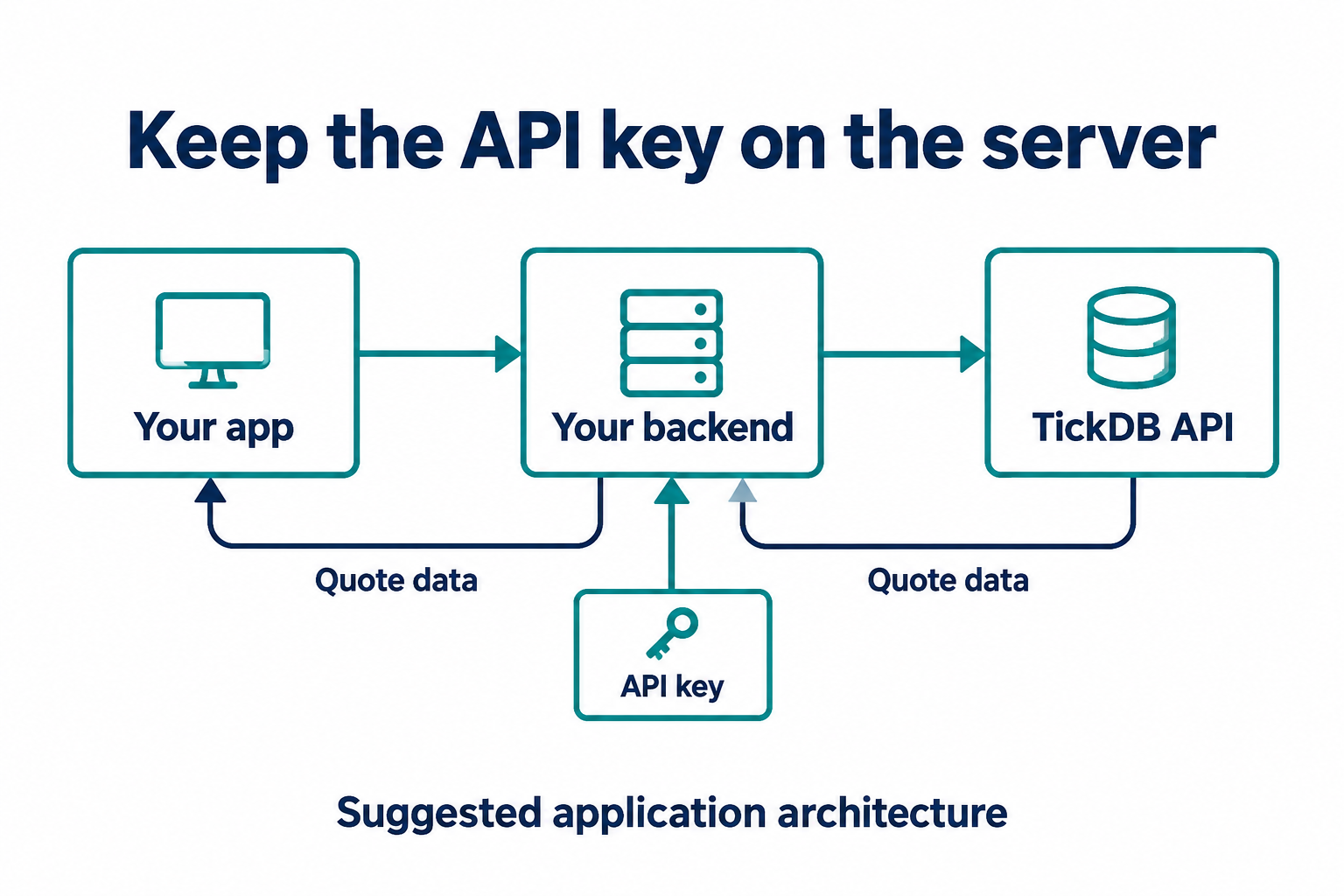
Figure 1. Suggested application architecture. The API key stays with your backend; quote data returns to the application. This is a design illustration, not an official deployment diagram.
Create a local Python environment and install the HTTP client:
python3 -m venv .venv
source .venv/bin/activate
python -m pip install requests
export TICKDB_API_KEY='replace_with_your_api_key'
These activation and environment-variable commands use a macOS or Linux shell. Use the equivalent commands for your operating system. For deployment, inject the key through your service’s secret configuration; do not commit the value to source control.
2. Verify the smallest request first
REST requests authenticate with the X-API-Key header. The snapshot endpoint takes a required symbols parameter; the following request explicitly selects the stock product type.
curl --silent --show-error \
  --connect-timeout 5 --max-time 20 \
  -H "X-API-Key: $TICKDB_API_KEY" \
  'https://api.tickdb.ai/v1/market/ticker?symbols=AAPL.US&type=stock'
Inspect the response before adding more code. A successful response has code equal to 0 and a data array. For this request, look for a row whose symbol is AAPL.US and check that last_price and timestamp are present. The price is represented as a string, and the timestamp uses Unix milliseconds.
Other fields, such as bid_price, ask_price, and volume_24h, depend on the instrument, trading session, and data availability. A missing optional field should remain unavailable in your application; replacing it with zero changes its meaning.
3. Turn the request into a reusable function
Save the following as tickdb_quote.py. It performs one request, rejects HTTP and business-level failures, and returns a small object that a quote display can consume. It deliberately leaves automatic retries to the caller so that a failed request cannot silently turn into an uncontrolled polling loop.
import json
import os
from datetime import datetime, timezone
from decimal import Decimal, InvalidOperation

import requests

URL = "https://api.tickdb.ai/v1/market/ticker"


def fetch_quote(symbol, api_key):
    response = requests.get(
        URL,
        params={"symbols": symbol, "type": "stock"},
        headers={"X-API-Key": api_key},
        timeout=(5, 15),
        allow_redirects=False,
    )
    try:
        body = response.json()
    except ValueError as exc:
        raise RuntimeError(
            f"HTTP {response.status_code}: non-JSON response"
        ) from exc
    if not isinstance(body, dict):
        raise RuntimeError("Expected a JSON object")
    code = str(body.get("code", "UNKNOWN"))
    if not 200 <= response.status_code < 300 or code != "0":
        retry_after = response.headers.get("Retry-After")
        raise RuntimeError(
            f"HTTP {response.status_code}, code={code}, "
            f"Retry-After={retry_after}"
        )
    rows = body.get("data")
    if not isinstance(rows, list):
        raise RuntimeError("Expected a quote list")
    matches = [row for row in rows if isinstance(row, dict)
               and row.get("symbol") == symbol]
    if len(matches) != 1:
        raise RuntimeError("Expected one matching quote")
    row = matches[0]
    try:
        price = Decimal(row["last_price"])
        timestamp = row["timestamp"]
        if not price.is_finite():
            raise ValueError("Non-finite price")
        if type(timestamp) is not int or timestamp <= 0:
            raise ValueError("Invalid timestamp")
        quote_time = datetime.fromtimestamp(
            timestamp / 1000, tz=timezone.utc
        )
    except (KeyError, TypeError, ValueError, InvalidOperation,
            OverflowError, OSError) as exc:
        raise RuntimeError("Invalid quote fields") from exc
    return {
        "symbol": row["symbol"],
        "last_price": str(price),
        "market_time_utc": quote_time.isoformat(),
    }


if __name__ == "__main__":
    key = os.environ.get("TICKDB_API_KEY", "").strip()
    if not key:
        raise SystemExit("Set TICKDB_API_KEY first")
    try:
        print(json.dumps(fetch_quote("AAPL.US", key), indent=2))
    except (requests.RequestException, RuntimeError) as exc:
        raise SystemExit(f"Quote request failed: {exc}")
Run it from the same environment:
python tickdb_quote.py
On success, the script prints a JSON object containing symbol, last_price, and market_time_utc. The values depend on the actual service response; no fixed example price is an expected result.
There are three details worth keeping when you move this function into a larger application. First, it checks the API code even when HTTP succeeds. Second, it matches the requested symbol explicitly, so an empty response cannot become a misleading quote. Third, it parses the price with Decimal and serializes it back to text, avoiding an unnecessary conversion through binary floating point.
The connection and read timeouts bound those individual waits; they are not a strict deadline for the entire operation. Add an application-level deadline if your service needs one.
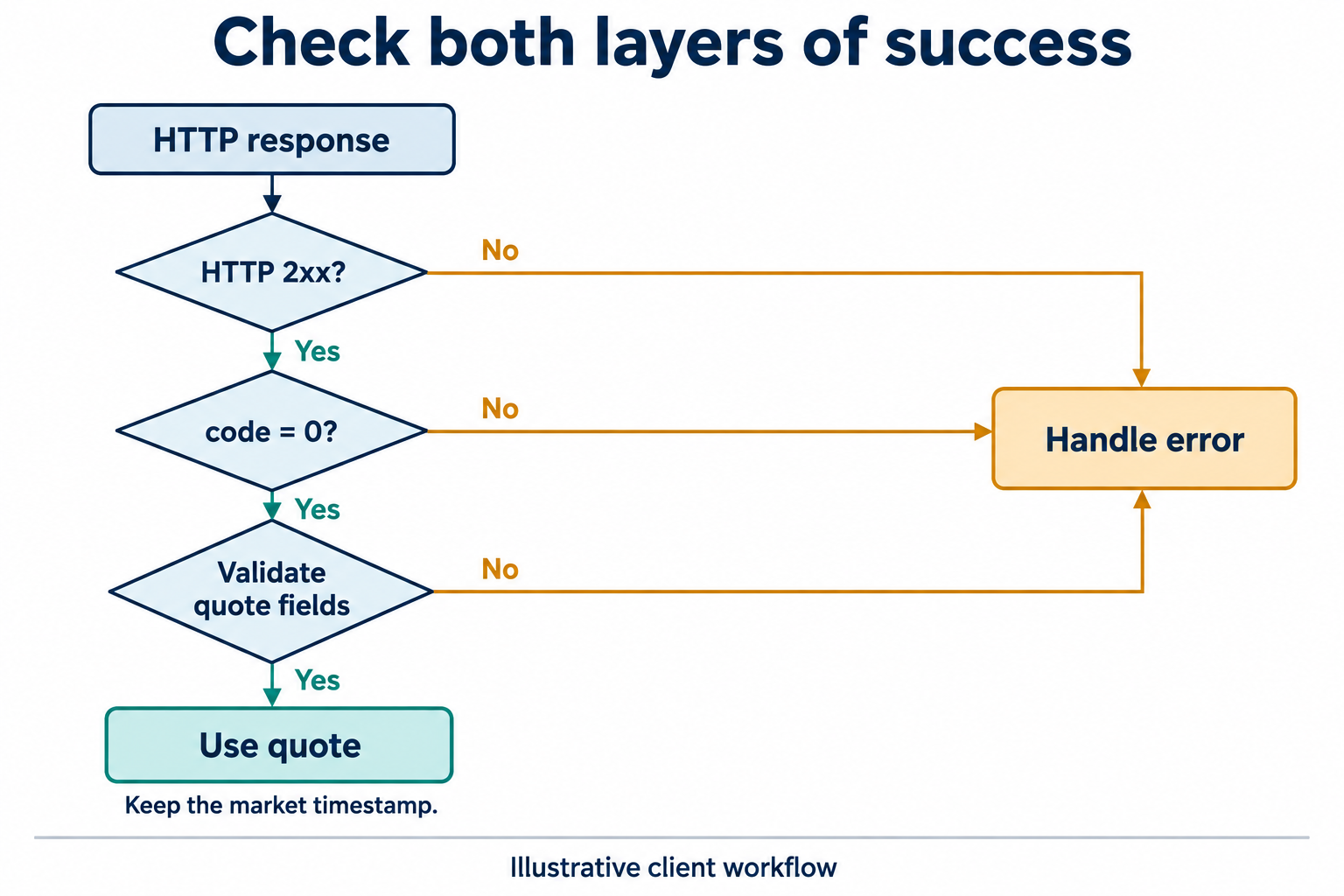
Figure 2. A response must pass transport, API, and field checks before the application uses it. The market timestamp remains attached to the quote.
4. Handle failures according to their cause
Repeating the same request is useful only when the underlying failure can change. If authentication fails, check the key and header. If the service reports insufficient permission, verify the key’s market and endpoint access. If a symbol is ambiguous, use the returned available product types to correct the request instead of guessing.
For rate-limit errors, use the Retry-After response header when supplied and reduce the request rate. Temporary service failures may justify a bounded retry with increasing delay. Set an attempt limit and an overall deadline; authentication, permission, and malformed-parameter errors need correction rather than repeated traffic.
The function reports the HTTP status, normalized API code, and Retry-After value. It does not print the credential. A production wrapper can preserve those fields as structured error attributes, then choose the appropriate response without parsing human-readable message text.
5. Connect the quote to a real application
For a quote card, map last_price to the displayed value and market_time_utc to an “as of” label. Keep a separate local fetch time if you need to show when your application last contacted the service. Replacing the market timestamp with the fetch time would make an older quote look newly generated.
An older market timestamp does not automatically identify an API failure. The market may be closed, the instrument may not have traded recently, or the selected session may have different update behavior. Check the relevant trading session and your data access conditions before deciding that a price is stale. The elapsed time since the market timestamp is also not a measurement of network latency.
When you extend the integration to a watchlist, the documented snapshot limit is 50 instruments per request. Batch within that limit, preserve symbol identifiers, and explicitly handle requested instruments that have no usable row. Your refresh interval must also fit your account’s request allowance. Repeated snapshots do not reconstruct every trade between requests.
Before connecting the function to a dashboard, verify a successful response, an invalid credential, a missing quote, and a temporary failure in a controlled test. The UI should show an unavailable or error state when the request fails; it should never present a fabricated zero price as a successful quote.
A first TickDB integration is ready for the next stage when it returns the intended instrument, preserves price and time semantics, and exposes failures clearly. That gives a dashboard, research script, or backend service a defined data contract to build on.
Source basis: TickDB Quick Start, Market Snapshot, and Error Codes documentation, checked October 29, 2026.