Choosing a Stock Price API: What Your Quote Dashboard Actually Needs
TickDB Research ·
Abstract: For financial app product leads, choosing a stock price API starts with the features a dashboard must deliver. This guide separates launch requirements from optional history, order-book and trade-data features, then turns them into a practical requirements sheet. A recorded TickDB MCP sample shows how to inspect the returned structure and timestamps. The article includes acceptance criteria and a reusable sample-checking script, so product and engineering teams can work from the same definition of done.
Suppose you are planning a stock quote dashboard. The first release has a straightforward promise: users can find their watchlist stocks, see a price and its change, and understand when that data was recorded.
API discussions can quickly expand the scope. Should the page include historical bars? How many order-book levels? A trade tape? Pre-market, post-market and overnight quotes?
Each additional dataset brings another set of product decisions: which session it represents, how it updates, what an empty result means, and why its figures may differ from another panel. Without a defined scope, an interface list gives engineering little guidance on when the work is complete.
Choose data to support the feature you have committed to deliver. Prioritize launch dependencies, add analytical datasets when the feature requires them, and design identity, time context and failure states from the first release.
1. Define the launch promise before reviewing endpoints
This article uses a hypothetical US-stock watchlist dashboard. Its first release shows security identity, a price and change for the selected session, ongoing updates and a stale-data indication. The example chooses the regular trading session; extended-session switching, order-book analysis, a trade tape and historical research are outside this release.
Those features may be essential to a different product. If the page promises historical performance, bars become a launch dependency. If it promises bid–ask spread monitoring, the relevant quotes belong in the initial scope. Priority follows the feature promise.
Replace “real-time stock data” in the brief with four explicit requirements:
- Universe: the market, actual security list and mapping between identifiers and display names.
- Meaning: which price and session the page shows, and the reference used for price change.
- Updates: the conditions under which data becomes stale during the target session.
- Failure behavior: what the page does for an unknown symbol, insufficient access, a missing field or an interrupted connection.
“Supports WebSocket” describes an access method. “Updates during the target session and visibly marks stale data” describes an acceptance criterion. The latter also depends on application logic, session rules and interface states.
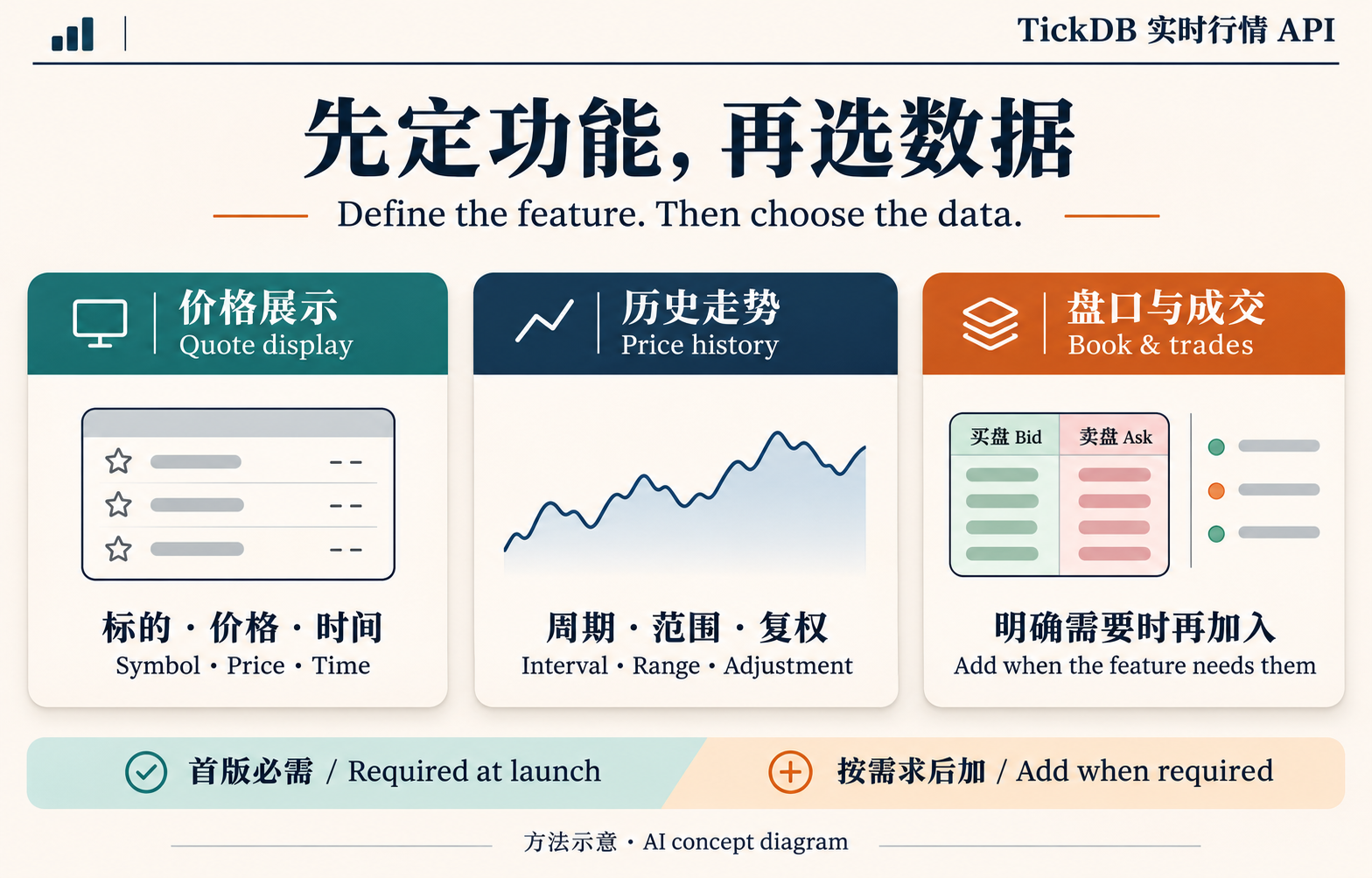
Figure 1. Concept diagram. Select datasets for the feature promise; history, depth and trades enter the initial release only when the intended features need them.
2. Complete the basic quote display first
Attach the price to an unambiguous security
Before displaying a number, establish the security, market and currency it belongs to. A short name helps people read the page; identifiers and market information help the application associate records correctly.
This matters when expanding across markets. Similar identifiers, different currencies and different sessions complicate a single table. Names and currency can come from a directory or reference dataset rather than every quote response, provided the application maintains an explicit mapping.
Give price change a defined reference
“Display percentage change” needs a reference price and session definition.
TickDB documents a last-trade price, reference close and percentage-change fields, while noting that fields beyond the core quote are conditional on product, session and availability. Check whether the returned values match the page's promise. A missing change field should appear as unavailable, rather than silently becoming zero.
If the application calculates change itself, retain the reference used. Two non-null numbers can still belong to different sessions or statistical conventions.
Ship timestamps and display states together
Data time identifies the market record's timestamp. Receipt time records when the application obtained the response. The interface can use a readable display format while the backend retains the original timestamp and timezone rules.
Staleness must reflect the product's session requirement. Retaining the last regular-session quote after that session ends may be an intended behavior. Keeping a “live” label after updates stop during the required session can mislead users.
At minimum, define current, stale and missing-data states. A timestamp in an API response provides an input to that behavior; the application must implement it.
3. Add history, order books and trades for a specific feature
Ask: Which committed feature would fail without this dataset?
| Feature to add | Additional data | Additional acceptance work |
|---|---|---|
| Historical chart | Bars for the required interval and range | Coverage, adjustment convention, gaps and unfinished intervals |
| Bid–ask or depth view | Relevant best quotes; deeper levels when needed | Returned depth, quantity units, timestamps and empty sides |
| Recent-trades panel | A recent-trades query or suitable trade stream | Window coverage, event times, units, duplicate handling and gaps |
| Extended-session switch | Data and labels for the relevant session | Consistent switching of price, reference and timestamp |
History: choose the chart's time scale
A current-quote release does not need a research module simply because years of history are available. Once a chart is required, specify daily or intraday bars, the display range and the adjustment convention.
Rendering a line completes a display task. Using the same history for backtesting introduces further questions about the security universe, data versions and research design. An available bar endpoint does not settle those questions.
Order books: observe quotes without promising execution
A last-trade price describes an executed transaction. An order book describes the visible quotes returned at a particular time. Spread monitoring needs the corresponding bid and ask; observing additional price levels requires suitable depth.
Supported depth is a scope and limit. The page must handle fewer returned levels and an empty side. Visible prices and quantities can change; they should not be presented as guaranteed executable prices or sizes.
Trades: distinguish a recent window from a continuous record
A recent-trades list can show what traded shortly before the query. Three or a hundred records do not establish complete trading-day coverage.
A continuous-record feature adds requirements for ongoing reception, interruptions, duplicates and gaps. Repeatedly refreshing a recent-record endpoint is insufficient evidence for a complete archive.
4. A requirements sheet engineering can use
The following sheet records decisions for the hypothetical dashboard. It is not a release sign-off.
| Feature and priority | Minimum data | Possible later capability | Acceptance method |
|---|---|---|---|
| Security identification: launch | Identifier, name, market, currency and mapping | Cross-market search | Check the full watchlist for ambiguity and unit errors |
| Price display: launch | Target-session price and data time | Extended-session switching | Match the selected fields to the session; keep price and time together |
| Price change: launch | A matching change field or calculation reference | Additional statistics | Check the reference and convention; do not fill missing values with zero |
| Updates and states: launch | Update records, data time, receipt time and errors | Enhanced recovery behavior | Test the target session and interrupt input to inspect stale and missing states |
| Historical chart: later in this example | Bars for the chosen interval | More intervals and research tools | Check range, conventions, gaps and bar completion |
| Book and trades: later in this example | Quotes or trade records for the chosen feature | Depth analysis or continuous trade recording | Check each dataset's scope, timestamp, units and empty states |
Attach the target account, complete symbol list, session, expected workload and intended audience—internal or customer-facing—to this sheet. Confirm capacity and use conditions against those requirements. A capability listed on a website does not establish access under the chosen account.
If a later feature becomes part of the launch promise, move its acceptance work into the launch scope too. Moving a feature's priority without defining its data checks leaves the dependency unresolved.
5. Inspect a TickDB sample against the requirements
TickDB offers access paths for quotes, historical bars, order books and trades across US, Hong Kong and China A-share stocks, with REST queries and WebSocket streaming available as applicable. Check the specific market, fields and account permissions. Here, an already-connected MCP integration was used for one AAPL.US sample rather than a complete dashboard implementation.
On November 10, 2026, the US directory was used to confirm Apple's identity, followed by separate quote, order-book and three-record trade queries. This summary shows structure and timestamps, without displaying price values.
| Dataset | Observed return | Data time, UTC |
|---|---|---|
| Main quote | Symbol, price, reference close, percentage change and timestamp fields | 2026-11-09 21:00:01 |
| Order book | One bid level and one ask level | 2026-11-10 04:01:56.484 |
| Recent trades | Three requested, three returned, labeled overnight | 2026-11-10 04:00:42–04:01:51 |
The retrieval was recorded during the 04:01 UTC minute on November 10. The calls are independent, rather than an atomic market snapshot, and are not a measurement of end-to-end latency.
The first product implication concerns session meaning. The quote response also contained pre-market, post-market and overnight objects. A regular-session release needs to verify that its selected fields match the intended session and retain the corresponding label. Adding overnight data later requires handling that object's price and its own timestamp together. A later timestamp in another object is not a reason to switch a price silently while retaining the old label.
The returned book level and three trades describe this sample's structure. They do not establish sufficient depth or complete trade coverage for a feature. The full watchlist, continuous updates, WebSocket behavior and external-display conditions were not tested; the account tier was not verified.
Obtain a sample for your own brief
In a client already connected to TickDB MCP, use a task such as the following. Preserve errors rather than asking the assistant to fill in successful responses.
Confirm Apple in the US stock directory, then query AAPL.US:
1. get_ticker: symbols="AAPL.US", type="stock";
2. get_order_book: symbol="AAPL.US", type="stock";
3. get_recent_trades: symbol="AAPL.US", type="stock", limit=3.
Save the complete business JSON from each tool as ticker_raw.json,
depth_raw.json and trades_raw.json. Record the retrieval time.
Report fields, counts and timestamps separately for each module.
Do not treat the responses as one simultaneous snapshot.
Preserve failed responses; do not create simulated success files.
The appendix script reads those files and writes sample_check.csv. It checks structure and timestamps, rather than market-data correctness, ongoing operation or release readiness.
The TickDB stock API page provides an entry point for matching the sheet to market capabilities, access methods and use conditions.
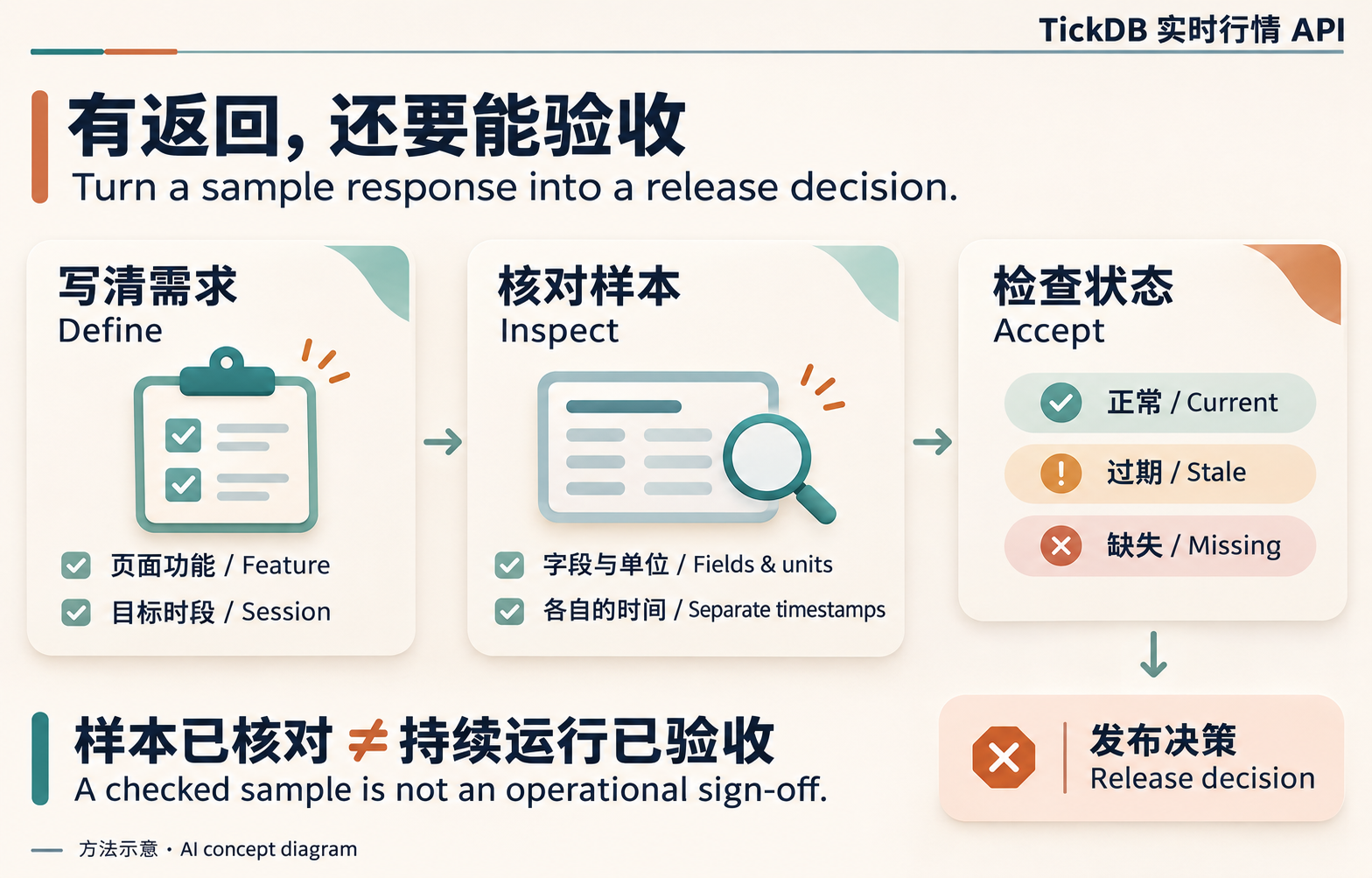
Figure 2. Concept diagram. A sample check establishes returned structure; ongoing updates, failure behavior and intended-use conditions require their own acceptance work.
6. Align the brief, sample and acceptance checklist
Prepare three artifacts: a completed data requirements sheet, a real sample with its timestamps and conditions, and an executable acceptance checklist.
The brief explains why the dataset is needed. The sample shows engineering what actually returned. The checklist describes what the page should do in current, stale and missing states. Together, they expose features that entered the release scope without a defined data dependency or failure behavior.
Start with one committed feature. Specify its data, selected session, acceptable missing-data behavior and acceptance method. Then select endpoints, permissions and optional capabilities against that definition.
Sources and sample date: November 10, 2026. Samples came from TickDB MCP; field and capability descriptions were checked against current TickDB documentation. The product brief is hypothetical. Confirm actual conditions for the target market, account and intended use.
Appendix: inspect saved sample payloads
Save the following as check_sample.py beside the three JSON files and run python3 check_sample.py. It requires Python 3.10 or later, uses only the standard library and makes no network requests. No API key is needed. It stops on an unsuccessful business response, symbol mismatch or a missing required quote field.
"""Python 3.10+; inspect saved TickDB MCP payloads, without network calls."""
import csv
import json
from datetime import datetime, timezone
from pathlib import Path


def read_payload(filename):
    payload = json.loads(Path(filename).read_text(encoding="utf-8-sig"))
    if payload.get("code") != 0:
        raise ValueError(f"Unsuccessful API response: {filename}")
    return payload["data"]


def utc(value):
    if type(value) is not int or value < 0:
        raise ValueError("Expected a nonnegative millisecond timestamp")
    return datetime.fromtimestamp(value / 1000, timezone.utc).isoformat()


def main():
    symbol = "AAPL.US"
    quotes = read_payload("ticker_raw.json")
    matching = [row for row in quotes if row.get("symbol") == symbol]
    if len(matching) != 1:
        raise ValueError("Expected exactly one matching quote")
    quote = matching[0]
    book = read_payload("depth_raw.json")
    tape = read_payload("trades_raw.json")
    if book.get("symbol") != symbol or tape.get("symbol") != symbol:
        raise ValueError("The payloads refer to different symbols")
    required = ("last_price", "timestamp")
    if any(quote.get(key) is None for key in required):
        raise ValueError("Missing a required quote field")
    bids, asks, trades = book["bids"], book["asks"], tape["trades"]
    times = [row["timestamp"] for row in trades]
    rows = [
        ["quote", symbol, "required_fields_present", utc(quote["timestamp"])],
        ["depth", symbol, f"bids={len(bids)};asks={len(asks)}", utc(book["timestamp"])],
        ["trades", symbol, f"rows={len(trades)}",
         f"{utc(min(times))} to {utc(max(times))}" if times else "empty"],
    ]
    with Path("sample_check.csv").open("w", newline="", encoding="utf-8-sig") as file:
        writer = csv.writer(file)
        writer.writerow(["module", "symbol", "observed_structure", "data_time_utc"])
        writer.writerows(rows)
    for row in rows:
        print(" | ".join(row))
    print("Saved sample_check.csv; structure check only, not release approval")


if __name__ == "__main__":
    try:
        main()
    except (OSError, ValueError, TypeError, KeyError) as error:
        raise SystemExit(f"STOP: {error}")